

A run failed
Start in the Logs tab (L). Failed runs show an Error status with the error message in the row; the search box finds runs by error text.
Click the run row to replay it on the canvas: nodes carry success or error rings, so the failing step is visible at a glance. Click the failed node to see the exact inputs it received and the error it produced, then fix the config and run again. See Execution logs.
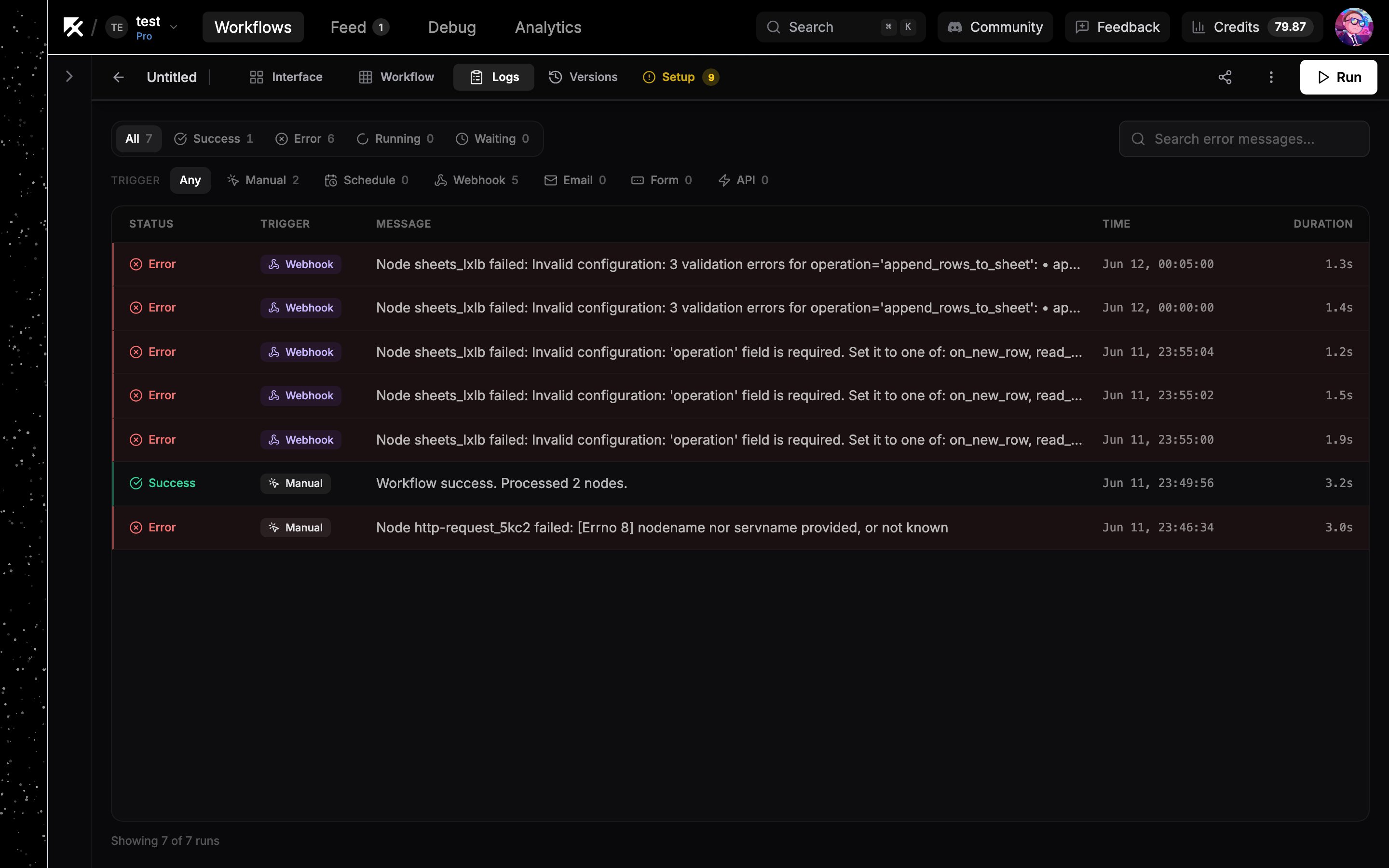
A failed run in the Logs tab with its error message.
Insufficient credits
A run needs a minimum balance of 0.20 credits to start. Below that, runs fail with an “Insufficient credits” error that names your NoClick balance as the one that ran out, and its Add credits button opens the credits popup on the spot.- Check your balance and recent spend in Settings → Usage (Usage dashboard).
- On the Free plan there’s also a daily cap of 5 credits, so runs can stop for the day even with monthly credits left.
- Plan credits reset monthly; to keep going now, buy a top-up or upgrade your plan.
- Organization workflows draw from the org owner’s credit pool, so check the owner’s balance, not the runner’s.
- A turn on a CLI coding agent needs 1 credit to start, and its sandbox is stopped mid-turn if your credits run out while it works. Files the agent saved to its workspace are kept. See What costs credits.
Integration nodes running on your own connected accounts cost nothing. Credits cover NoClick-keyed AI usage, the AI builder, and a few metered APIs. See What costs credits.
A model provider rejected an agent run
When an agent runs on your own API key or AI subscription and the provider refuses the call, NoClick rewrites the provider’s raw error into a sentence that names the cause, and adds a button where there is something to click. The provider’s original text is kept underneath, after Provider message.
The key in question is always the one matching the model you picked. A key connected on the same node for another provider is ignored rather than used, so it cannot be the one being rejected. See The key has to match the model.
These messages say explicitly when the balance in question belongs to the provider rather than to NoClick, because a raw “credit balance is too low” from a model provider reads like NoClick credits running out. Failures nobody can act on, like a rate limit or an outage, carry no button.
Only agent failures are rewritten this way, and only agent failures get a button pointing at a provider. Every other node shows its service’s error verbatim, so a bad Stripe or YouTube key reads exactly as that service reported it, and a service whose own wording happens to mention credits or an invalid key is not mistaken for a model provider.
An agent turn was lost
A turn on a CLI coding agent can end without a reply, for example when its sandbox stops before the answer comes back. The chat shows an error in place of the reply saying the turn was lost and that the reply may not have been sent, and the composer unlocks so you can send the message again.- Sending the message again is the fix. The conversation keeps its history, and files the agent saved to its workspace are still there.
- A lost turn is recorded as a failed run, so it appears in your run history with the same error. See Running and testing.
- A turn that produces no output for 30 minutes is treated as stalled and stopped, so a long command that prints nothing while it works can end this way. Splitting it into steps that print progress keeps the turn alive.
- Sandbox time stops being billed when the sandbox stops. See What costs credits.
Required fields missing
A node with unfilled required fields can’t run correctly. Three places surface this:- Pressing Run opens a popup listing every step that still needs setup, and you fill them in there before the run starts. See Before running.
- In the node’s config panel, unfilled Required fields carry an amber badge, and an amber banner at the top lists what is still missing. Click a field name in the banner to jump to that field.
- An amber pill at the bottom left of the canvas counts the nodes that are still incomplete, whether that is a missing field or a missing credential. Its arrows move you from one to the next.
A required field is empty
A field filled with a reference can come back with no value, because the referenced step’s output has no key by that name or that key holds null. When the field is required, the step fails with an error that startsRequired field 'name' is empty and then names the reference, what the referenced step’s output really holds, and its top-level keys.
- Compare the keys in the error with the reference you wrote. Usually one of the listed keys is the value you meant, for example an incoming chat id that arrives under
payload.fromrather thanchat_id. - Open the referenced step’s Output panel and drag the value into the field. A dragged reference always matches the real shape.
- If the error says a trigger has no live event in this run, that is a manual run reading a trigger that waits for events. Fire the workflow the way it runs in production, by sending the message or calling the webhook, to test that path.
A scraping step failed
The Instagram, LinkedIn, and Reddit scraping steps run on NoClick’s infrastructure. When that scrape does not complete, or comes back with records the node cannot read, the step fails and the error names what went wrong instead of passing an empty result down the flow. A step that used to look successful with nothing in it now stops the run, so a later step never works from an empty list. Rerun the step first, since most of these are one-off failures at the provider. If it keeps failing, narrow what you asked for: fewer results, one profile or subreddit at a time, or a public account rather than a private one. The work the provider already did is still metered, so repeated retries use credits (What costs credits).Rate limits from providers
Third-party APIs throttle heavy use. When a provider rejects a call for rate limiting, the provider’s error appears as the node’s error in Logs. Usually waiting and rerunning is enough. If it keeps happening:- Space out scheduled runs or process fewer items per run.
- On providers that support it, bring your own OAuth app or API key so you get your own quota.
- Route failures down a dedicated branch with error handling so one throttled call doesn’t sink the whole run.