

Connect from a node
1
Open the node's Credentials tab
Click the node, then open the Credentials tab (
K) in the config panel.2
Pick or create a credential
Choose an existing account from Select credential…, or create one in place. The dropdown’s footer offers Connect new for OAuth services and Create new for API-key services.
3
Complete the connection
For OAuth, a provider sign-in window opens; approve access and the window closes. For API keys, paste your key into the form. Either way the new credential is selected on the node automatically.
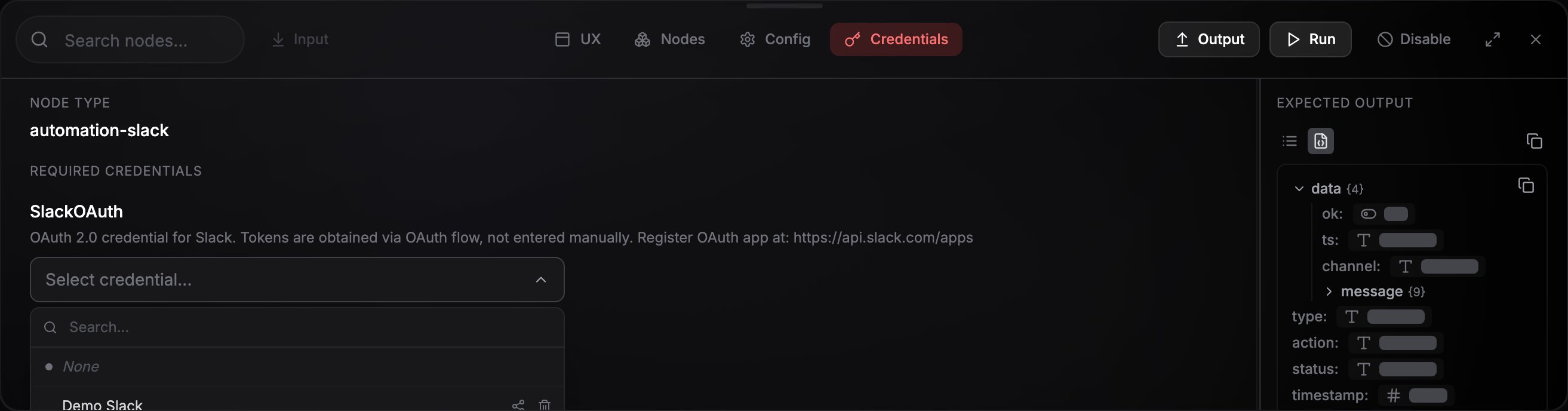
The Credentials tab on a node: pick an existing account or connect a new one.
OAuth services
Around 25 services (Google, Slack, GitHub, Notion, X, and more) connect with a browser consent flow: click Connect [Service] Account, sign in, approve the requested permissions, done. NoClick stores the resulting tokens and refreshes them automatically, so you don’t need to reconnect when they expire. The permissions NoClick asks for are the ones the service’s operations actually need, and each integration’s page lists the exact set. A connection keeps only what it was granted when you made it, so reconnect it if a step later fails on a permission. See Credential problems. A few providers ask for one extra detail before the sign-in window opens, like your Shopify store name or your Jira site.Microsoft work or school accounts. Some organizations don’t let people approve apps themselves, so Microsoft shows Need admin approval instead of its consent screen. An admin in that organization can click approve NoClick for your organization under the Connect button: Microsoft’s admin-consent page grants the permissions once for everyone in the directory, then continues into the admin’s own sign-in. After that, anyone there connects normally. Personal Microsoft accounts never see this.
API-key services
Other services use a key you paste in. The form lists exactly the fields the service needs, along with how to obtain them, and most include a Get your API key here link that takes you to the provider page where the key is issued. Every field in a credential form carries a badge: Required fields show an amber badge until you fill them, Optional fields stay neutral. This is the same marking node config fields use.What happens when you save
NoClick checks a key you type in before it stores it, so a bad paste is caught at the form rather than at the first run. First it tidies what you entered: surrounding whitespace is dropped, and a field that holds a key or token rejects a web address or leftover placeholder text. Some services read more out of a paste than you typed, so pasting a full browser URL into a server field can fill in the rest of the form for you. Anything it cannot make sense of is reported under the field it belongs to, and clears as you edit. Then it asks the provider, using the same read-only call that proves a connection works elsewhere in NoClick. One of three things follows:Not every service has a check to run. Where a service declares none, the credential saves and reads Saved, not verified. That is the same wording used for a provider that could not be reached, and it means the key is stored and untested, not that anything is wrong with it.
WhatsApp is the exception to both patterns: it connects by scanning a QR code with your phone.
When a connection drops
Some connections can stop working from the provider’s side. An expired sign-in makes a credential unusable, a WhatsApp connection can be dropped when the phone unlinks the device or the provider logs the session out, and a Discord Bot Install connection stops working once someone removes NoClick’s bot from the server. Either way, messages stop arriving and runs that use the credential fail. NoClick reports this in every place your credentials are read:- The credential picker labels the credential Disconnected and sorts it below the healthy ones.
- The node’s Credentials tab explains what happened and how to repair that connection: re-scan the QR code for a WhatsApp credential, or add the bot back to the server for a Discord one.
- Asking an AI agent or the AI builder about the workflow reports the credential as attached but disconnected, rather than as working.
- You get an email, unless you have turned that alert type off. See Email notifications.
Services that run without a key
A few nodes can run on NoClick’s own keys, so connecting an account is optional. Their Credentials tab is headed API Credentials and carries a green Usage-based billing available - credentials optional marker, and while nothing is attached it reads Using NoClick’s usage-based billing (no credentials needed). Runs like that are metered against your NoClick credits. The picker stays available in the same place, so connect your own key whenever you would rather the provider billed you directly. Which nodes and operations this covers is listed under What costs credits.Manage credentials in Settings
Settings → Credentials lists every credential you can use, grouped into Personal, Shared With Me, and (when you’re in an organization) Organization tabs. From here you can search, create credentials with New credential, share a credential, or delete one. The shield on a row opens that connection’s Tool permissions, where you decide which of its actions run freely and which wait for your approval. See Tool permissions.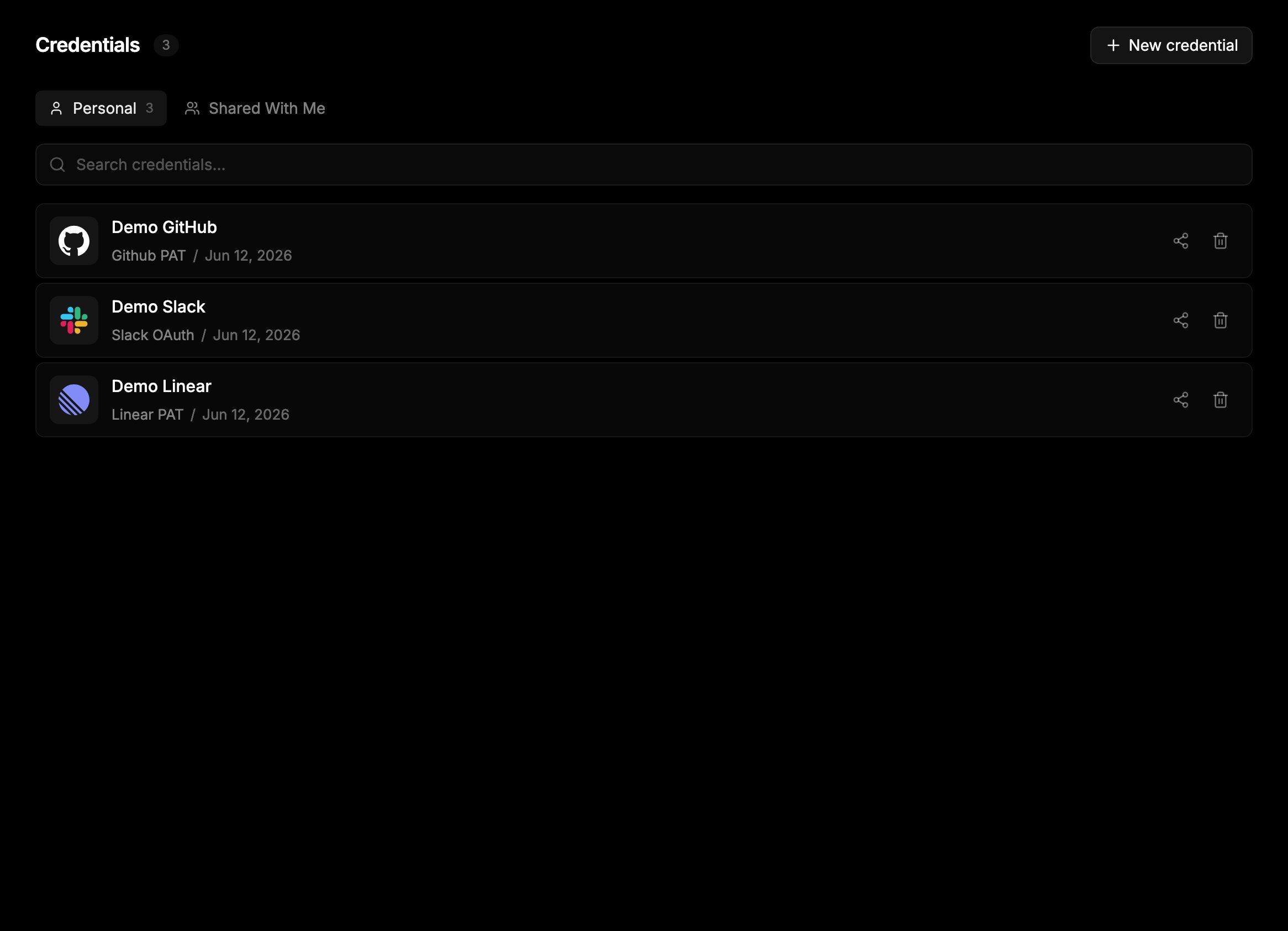
Settings → Credentials: all your connected accounts in one place.
Per-plan limits
Each plan caps how many credentials you can hold per service:
Hitting the cap shows an upgrade prompt when you try to connect another account of the same type.
Next steps
Bring your own OAuth app
Use your own client ID and secret on supported providers.
Credentials and other people
How collaborators and teammates use your connections.