

Plan comparison
Plan credits reset each calendar month. The Free plan is additionally capped at 5 credits per day. See What costs credits for how credits are spent.
Not sure which plan fits? The Estimate your month section on the pricing page asks a few questions about how you plan to use NoClick, then shows where your credits would go, the plan that covers it, and the monthly total.
On the Free plan, emails sent through the Gmail and Outlook nodes include a small “Sent from NoClick” footer. Paid plans send without it.
Monthly vs yearly billing
Yearly billing saves 40% compared to paying monthly: Plus is $180/yr (equivalent to $15/mo) and Pro is $360/yr (equivalent to $30/mo). You can switch between monthly and yearly with the Monthly / Yearly toggle wherever plans are shown.Enterprise
Enterprise adds SSO/SAML, unlimited team members, whitelabeling, and dedicated support, with custom pricing. Click Talk to Sales in Settings → Billing to get in touch.Shopify App Store installs
If you installed NoClick on a Shopify store from the Shopify App Store, your account runs on the Free plan and stays there. Paid plans and recurring credit top-ups are not offered through that channel, so Settings → Billing shows a Free Plan card saying so instead of the upgrade cards, and the upgrade prompts elsewhere in the app carry the same message. The Free plan limits in the table above still apply, so reaching the workflow limit means deleting a workflow rather than upgrading. See Shopify.Upgrading
1
Open billing settings
Go to Settings → Billing. Your current plan is shown at the top, with upgrade cards for the plans above it.
2
Pick a plan and interval
Use the Monthly / Yearly toggle on the upgrade card, then click Upgrade to Plus or Upgrade to Pro.
3
Complete checkout
You are redirected to Stripe checkout. The new plan applies as soon as payment completes.
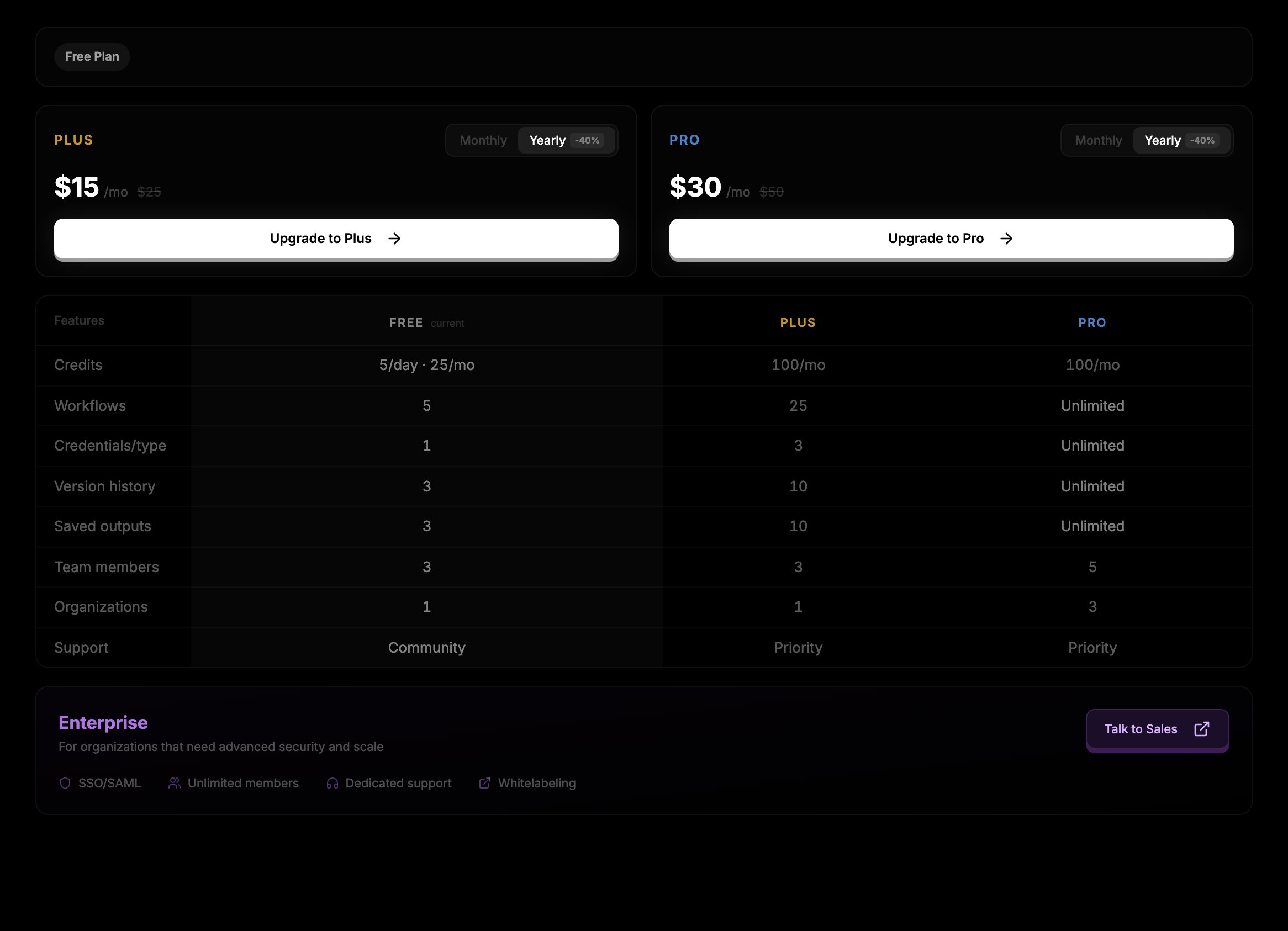
Settings → Billing shows your current plan, upgrade options, and the plan comparison table.
Managing your subscription
On a paid plan, Settings → Billing shows a Manage Subscription button next to your current plan. It opens the Stripe customer portal, where you can update your payment method, view invoices, change your billing interval, or cancel. When you cancel, your plan stays active until the end of the period you have already paid for, then your account moves to Free. The renewal or expiry date is shown next to your plan badge in Settings → Billing.Organization plans are billed separately from personal plans. Organization owners and admins manage them from the organization’s settings. See Organizations.