

Symptoms
- Runs fail with authorization errors (the provider rejecting the call) in the Logs tab.
- Dropdown fields that load options from the account (channels, spreadsheets, boards) stop loading.
- The node’s Credentials tab shows an error panel with a Reconnect button.
Why it happens
OAuth tokens normally refresh automatically, so day-to-day expiry never needs your attention. A credential genuinely breaks when the provider revokes access: you changed your password, removed the app from the account’s authorized apps, the account lost the required permissions, or a provider with rotating tokens invalidated the chain after a long disconnection. In those cases only a fresh sign-in fixes it.Reconnect an OAuth credential
1
Open the node's Credentials tab
Select any node that uses the credential and open its Credentials tab (
K).2
Sign in again
If an error panel is showing, click Reconnect. Otherwise click Connect Another Account and complete the provider sign-in with the same account.
3
Verify
Make sure the node has the right credential selected, then run the node. Dropdown fields loading again is a quick health check.
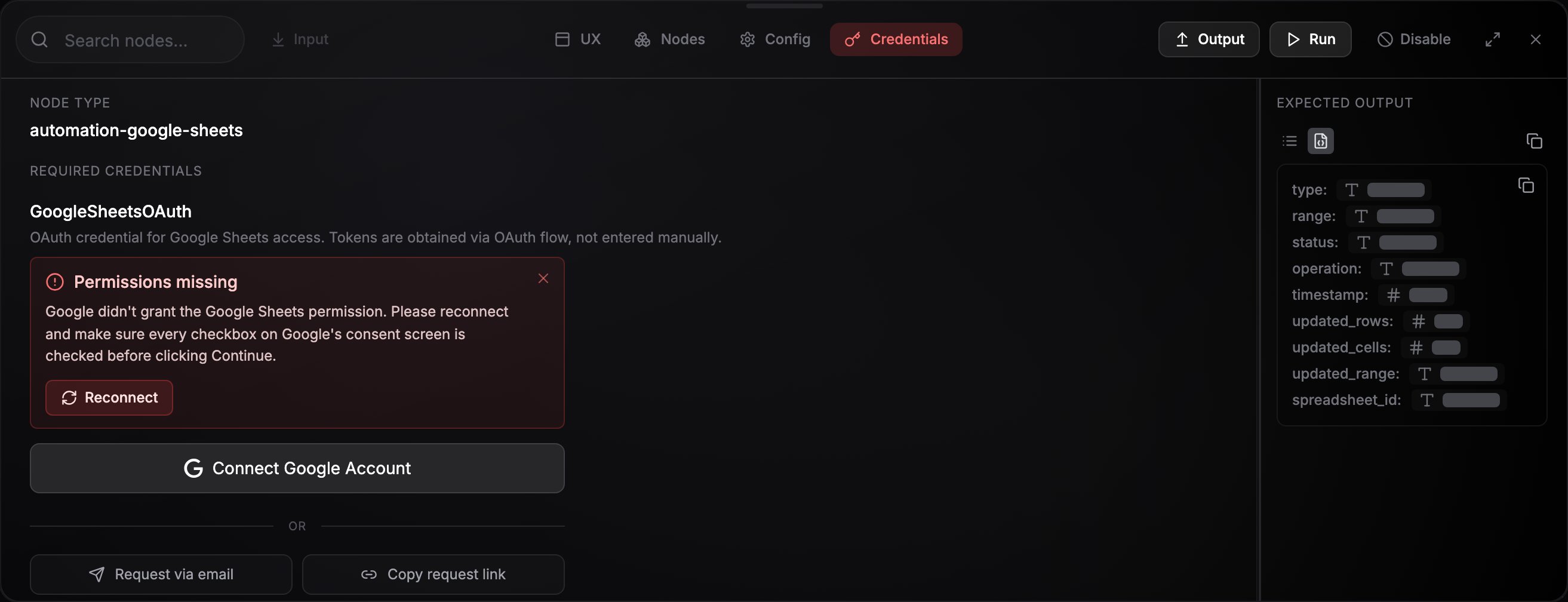
The credential error panel with its Reconnect button.
A step fails on a permission, not on sign-in
A connection carries the permissions you approved on the day you made it, and nothing more. When NoClick starts requesting a permission an operation needs, existing connections do not pick it up on their own, so a step can fail on a permission while the credential itself is healthy. Reconnect the credential with the steps above and approve the new consent screen. Each integration’s page lists the permissions NoClick requests for that service, so you can check what a fresh connection would grant. A few operations need more than a connection can carry, and those are marked in the operation picker: see Configuring nodes.Microsoft says “Need admin approval”
Some organizations don’t let people approve apps for themselves, so a work or school account sees Need admin approval instead of Microsoft’s consent screen, and NoClick reports that an admin has to approve it first. An admin in that organization fixes it once for everyone: under the Connect button on any Microsoft node (Excel, Outlook, OneDrive, Word, Teams, To Do), click approve NoClick for your organization. Microsoft’s admin-consent page grants the permissions for the whole directory and then continues into the admin’s own sign-in. Afterwards anyone in the organization connects normally. Personal Microsoft accounts never need this.Connected, but the API is not open to you yet
Some providers hand out a working sign-in while still refusing the API behind it. Google Business Profile is the case NoClick checks for: right after you connect, it calls the Business Profile API with your new credential and, if your Google Cloud project has no access, shows the error panel with an Apply for API access link next to Reconnect. Google grants that access to verified businesses on request, and the API also has to be enabled in the project itself. Until it is, the credential is fine and every call fails. Google DV360 behaves the same way. A Google account that is not linked to a Display & Video 360 user profile signs in normally, then every step fails on authentication. NoClick adds a note to those errors saying the account may not be linked to a DV360 user profile or may lack the role a step needs. A DV360 administrator adds the account under Admin → Users with access to the partner or advertiser you are working with. See Google DV360.A WhatsApp QR connection shows as disconnected
WhatsApp connects by pairing with your phone, and unlinking NoClick from the linked devices on the phone ends that pairing. NoClick checks the pairing when it lists your credentials and marks one that is no longer linked with an amber Disconnected label in the picker. Disconnected credentials sort below the working ones, and NoClick skips them when it picks a credential for a node on its own. Reconnect the credential you already have rather than making a second one. Select it on the node, and the Credentials tab shows a QR code for it. Scanning repairs that credential in place, so the workflows and triggers already using it keep working and you are not charged the monthly connection fee twice. Scanning a fresh code for a number that already has a credential does the same thing: NoClick reconnects the credential you have instead of adding a second one for the same phone. That matters because every extra scan adds another linked device on the phone, and WhatsApp can log all of them out at once.A Discord connection shows as disconnected
A Discord Bot Install connection is a server that NoClick’s bot was added to, and a server admin can remove the bot at any time. NoClick asks Discord about the server when it lists your credentials, and marks the connection as disconnected once Discord says the bot is no longer there. Message triggers and Discord tools on that connection stop working until you connect Discord again and pick the same server. Discord failing to answer at all is not treated as a removal, so an outage does not mark your connection dead.Replace an API key
If a pasted key was revoked or rotated, select the credential on a node, click Edit credential, and enter the new key. Stored values are never displayed back, so you re-enter the field. The new key is checked with the provider before it replaces the old one, so a key that is refused leaves the credential as it was and tells you what the provider said. See What happens when you save.On a shared workflow
A credential tagged “Owned by [someone]” belongs to the workflow owner, and only they can reconnect or edit it. Ask the owner to refresh the connection, or attach your own credential to the node instead.Dead credentials you no longer need can be deleted from Settings → Credentials. Nodes that were using a deleted credential need a new one selected before they can run.