

Supported providers
Connect with your own app
1
Open the connect form
On the node, open the Credentials tab and find the OAuth connect section for the provider.
2
Expand the custom credentials section
Click Use custom OAuth app credentials. It’s optional and collapsed by default.
3
Enter your Client ID and Client Secret
Paste both values from your provider’s developer console, then click Connect [Provider] Account. The consent flow now runs against your app.
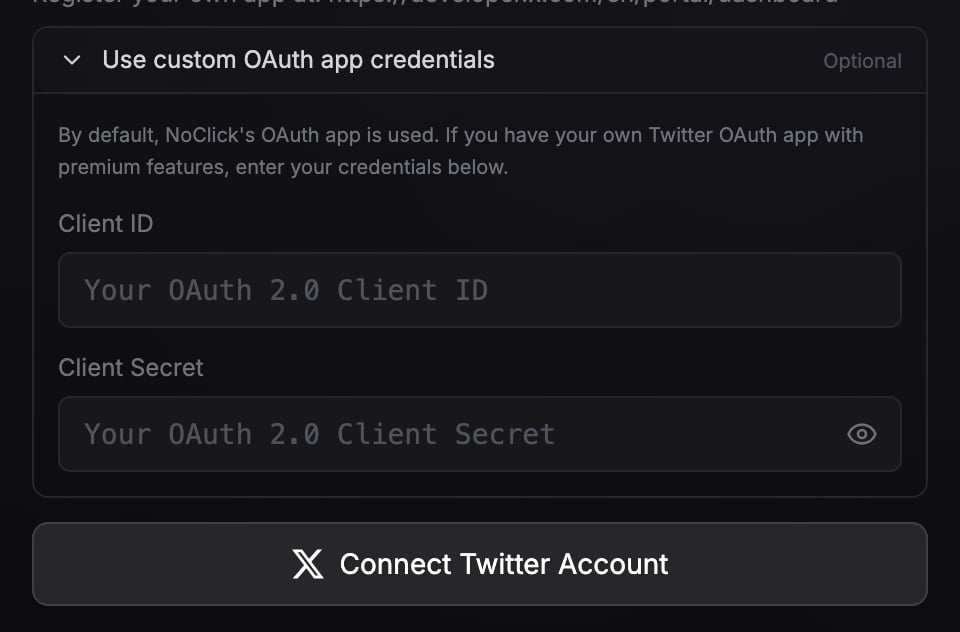
The custom OAuth app section expanded, with Client ID and Client Secret fields.
The redirect URI to add
Your OAuth app has to allow NoClick’s callback URL, or the provider refuses the connection. For QuickBooks, Shopify, and Google Business Profile, the connect form prints the exact URI under Redirect URI to add in your OAuth app, ready to select and copy into the provider’s app settings. It shows in the node’s Credentials tab, and on the connect page when someone is asked to connect the account for you.Google Business Profile always needs your own OAuth app, not just optionally. Create a Web Application OAuth 2.0 client in your Google Cloud project, add the redirect URI above, and enable the Business Profile APIs. NoClick checks that access after you connect and tells you if the project does not have it.
When you’d want this
- Your own rate limits and tier. API quotas attach to the OAuth app. With your own app you’re not sharing NoClick’s pooled limits, and on X, operations that require a paid API tier run at whatever tier your developer account has.
- Your own billing on X. X API calls made through your own app are billed by X to your developer account directly, so NoClick doesn’t charge its per-resource X API credits for those runs. See What costs credits.
- Your own branding. Users approving the connection see your app’s name and logo on the consent screen.
Next steps
Connecting accounts
The standard OAuth and API-key flows.
How credentials are protected
Encryption, refresh, and who can see what.