

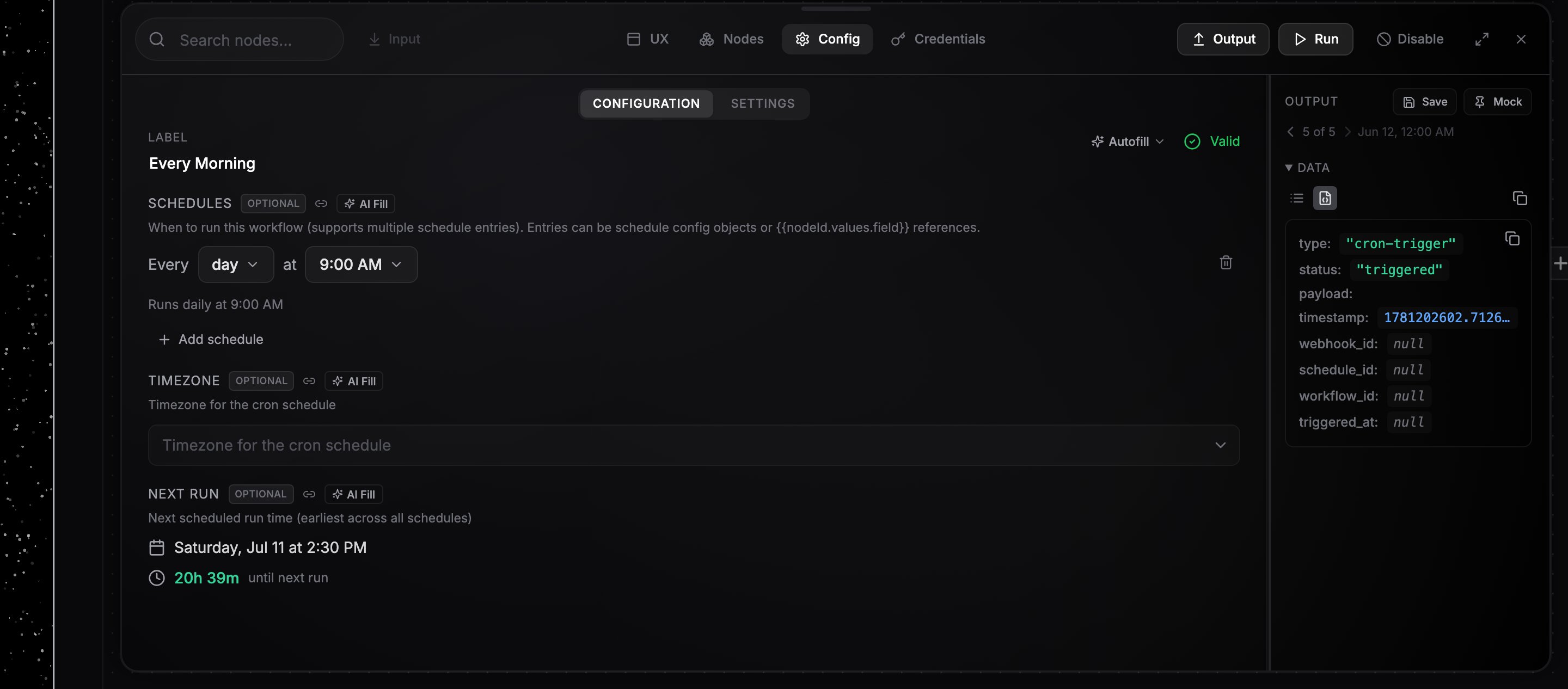
The Schedule node's config panel with the schedule picker and timezone
Set up a schedule
1
Add a Schedule node
Add the Schedule node to your canvas and connect its output to the first node you want to run.
2
Pick a frequency
The schedule picker reads as a sentence: “Every 30 minutes”, “Every day at 9:00 AM”, “Every week on Monday at 5:00 PM”. Frequencies: seconds, minutes, hours, day, week, weeks, and month. Interval frequencies take a number; day, week, and month schedules take a time (15-minute increments) and, where relevant, a day. A summary line below the picker confirms the schedule in plain language.
3
Narrow it down (optional)
The schedule reads as one sentence, and every part of it is editable in place: “Every 30 minutes · all day · every day · all year”. Click any of those words to limit that dimension:
- all day → from
9:00 AMto6:00 PM(inclusive: the 6:00 PM tick runs) - every day → tap day chips, or the Weekdays/Weekends presets
- all year → pick a day-of-month range (
1st–15th;25th–5thwraps month end) and/or months (August, orMarchthroughOctober;November–Februarywraps the new year)
All day, Every day, Any day, All year). The words shown adapt to the frequency. Interval schedules (seconds, minutes, hours) take all three, daily schedules everything but the day window, weekly and monthly ones the months. Stacked limits must all match: “every 30 minutes, 9:00 AM to 6:00 PM, weekdays, 1st to 15th, March to October” is exactly that.4
Set the timezone
Choose your timezone in the searchable Timezone dropdown. Run times, time windows, and day boundaries are all interpreted in this timezone, including across daylight-saving changes.
5
Check the next run
The Next Run field shows when the schedule fires next. Each run appears in the Logs tab with the trigger source
Schedule.Example schedules
Multiple schedules
One Schedule node can hold several schedules. Click Add schedule to add another entry; each fires independently. Removing every entry disables the trigger.Schedules are evaluated directly in your configured timezone, so daylight-saving changes are handled automatically. A 9:00 AM schedule fires at 9:00 AM local time year-round.
When a schedule keeps failing
A schedule whose runs keep dying the same way is paused, instead of producing another failed run on every tick. NoClick pauses it once the last five runs from that schedule have all failed with an identical error and those failures span at least 30 minutes, which a short provider outage does not reach. Pausing switches the trigger node off and records why:- You get one email naming the workflow, the paused trigger, the error, and when it was paused, and at most one per trigger per day. See Email notifications.
- The trigger appears on your Dashboard under Needs you and on the Triggers card, marked as paused with the same reason.
- On the canvas the trigger node is switched off, like any node you disable yourself.