> ## Documentation Index
> Fetch the complete documentation index at: https://docs.noclick.com/llms.txt
> Use this file to discover all available pages before exploring further.
# Webhooks
> Start workflow runs from any HTTP request with the Webhook trigger node.
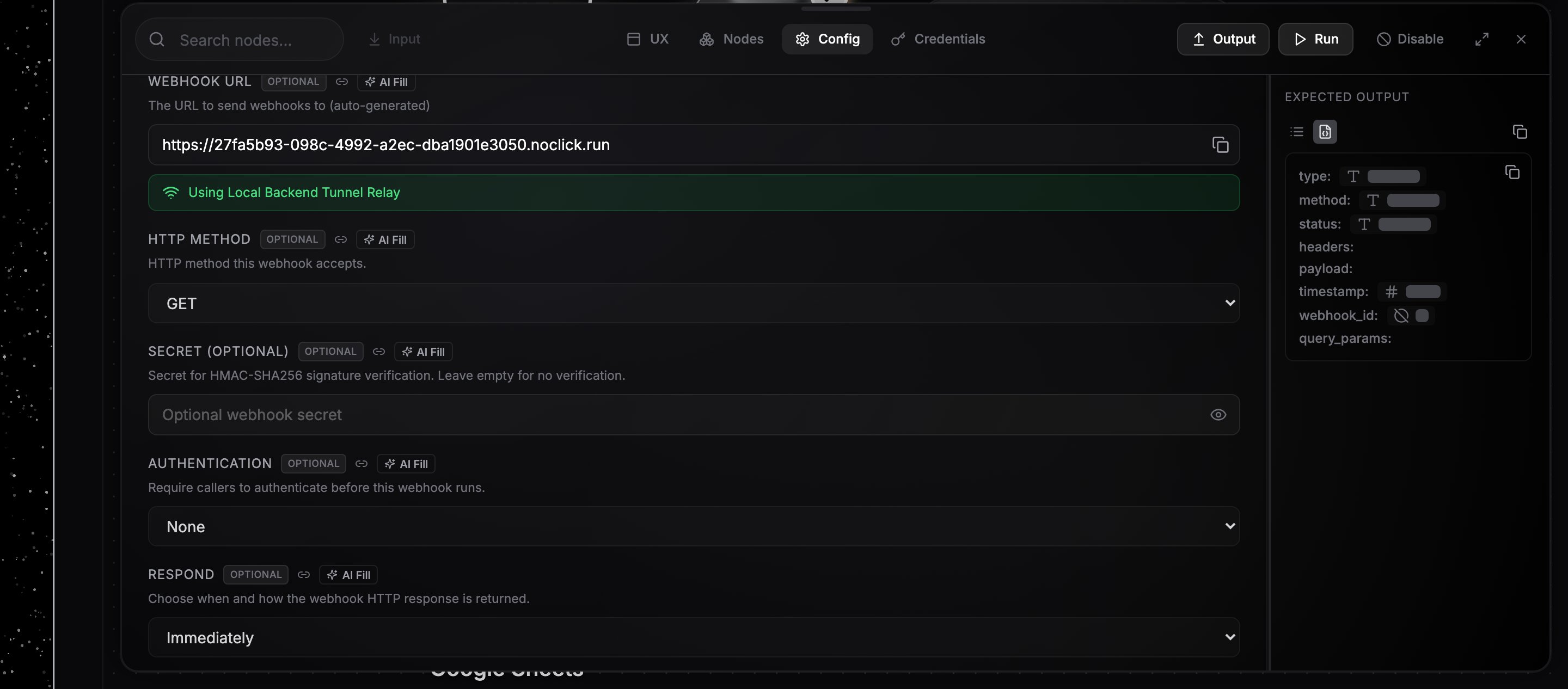
The **Webhook** node starts a run whenever an HTTP request hits its URL. Every Webhook node gets its own unique URL on `noclick.run`, created automatically when you add the node and shown in the config panel with a copy button.
 ## Send a request
Pick the **HTTP Method** the webhook accepts (GET, POST, PUT, PATCH, or DELETE; POST is the default), then send a request to the URL:
```bash theme={null}
curl -X POST "https://" \
-H "Content-Type: application/json" \
-d '{"customer": {"email": "ada@example.com"}, "amount": 42}'
```
Requests with a different method are rejected with a `405`.
## Use the payload downstream
The trigger node's output contains the request data:
* `payload`: the parsed JSON body (a non-JSON body lands in `payload.raw`)
* `headers`: the request headers
* `query_params`: URL query parameters
* `method`: the HTTP method
Reference any of it in downstream nodes with `{{node-id.path}}`, where `node-id` is the Webhook node's ID. For the request above, `{{webhook-1.payload.customer.email}}` resolves to `ada@example.com`. The easiest way to build a reference is to run the trigger once, then drag a field from its output panel into a downstream config field. See [Data references](/editor/data-references).
## Response behavior
The **Respond** field controls what the caller gets back:
* **Immediately** (default): the request returns a small JSON acknowledgment right away and the workflow runs in the background.
* **When Last Node Finishes**: the request stays open until the run completes, then returns the final node's output as JSON. If the run fails, the caller receives a `500` with the error.
## Securing the webhook
* **Secret**: set a secret to require an HMAC-SHA256 signature of the request body, sent in the `X-Hub-Signature-256` or `X-Webhook-Signature` header. Unsigned or mis-signed requests get a `401`.
* **Authentication**: require Basic Auth, a fixed header value, or an HS256-signed JWT before the workflow runs.
## Testing tips
* Send a sample request with `curl` and watch the run appear in the **Logs** tab with trigger source `Webhook`.
* Click the run in Logs to replay it and inspect the exact payload the trigger received.
* Disable the node to stop runs while keeping the URL live; requests are acknowledged but nothing executes.
## Send a request
Pick the **HTTP Method** the webhook accepts (GET, POST, PUT, PATCH, or DELETE; POST is the default), then send a request to the URL:
```bash theme={null}
curl -X POST "https://" \
-H "Content-Type: application/json" \
-d '{"customer": {"email": "ada@example.com"}, "amount": 42}'
```
Requests with a different method are rejected with a `405`.
## Use the payload downstream
The trigger node's output contains the request data:
* `payload`: the parsed JSON body (a non-JSON body lands in `payload.raw`)
* `headers`: the request headers
* `query_params`: URL query parameters
* `method`: the HTTP method
Reference any of it in downstream nodes with `{{node-id.path}}`, where `node-id` is the Webhook node's ID. For the request above, `{{webhook-1.payload.customer.email}}` resolves to `ada@example.com`. The easiest way to build a reference is to run the trigger once, then drag a field from its output panel into a downstream config field. See [Data references](/editor/data-references).
## Response behavior
The **Respond** field controls what the caller gets back:
* **Immediately** (default): the request returns a small JSON acknowledgment right away and the workflow runs in the background.
* **When Last Node Finishes**: the request stays open until the run completes, then returns the final node's output as JSON. If the run fails, the caller receives a `500` with the error.
## Securing the webhook
* **Secret**: set a secret to require an HMAC-SHA256 signature of the request body, sent in the `X-Hub-Signature-256` or `X-Webhook-Signature` header. Unsigned or mis-signed requests get a `401`.
* **Authentication**: require Basic Auth, a fixed header value, or an HS256-signed JWT before the workflow runs.
## Testing tips
* Send a sample request with `curl` and watch the run appear in the **Logs** tab with trigger source `Webhook`.
* Click the run in Logs to replay it and inspect the exact payload the trigger received.
* Disable the node to stop runs while keeping the URL live; requests are acknowledged but nothing executes.