> ## Documentation Index
> Fetch the complete documentation index at: https://docs.noclick.com/llms.txt
> Use this file to discover all available pages before exploring further.
# Forms
> Collect structured inputs and start a run with the Form Input trigger node.
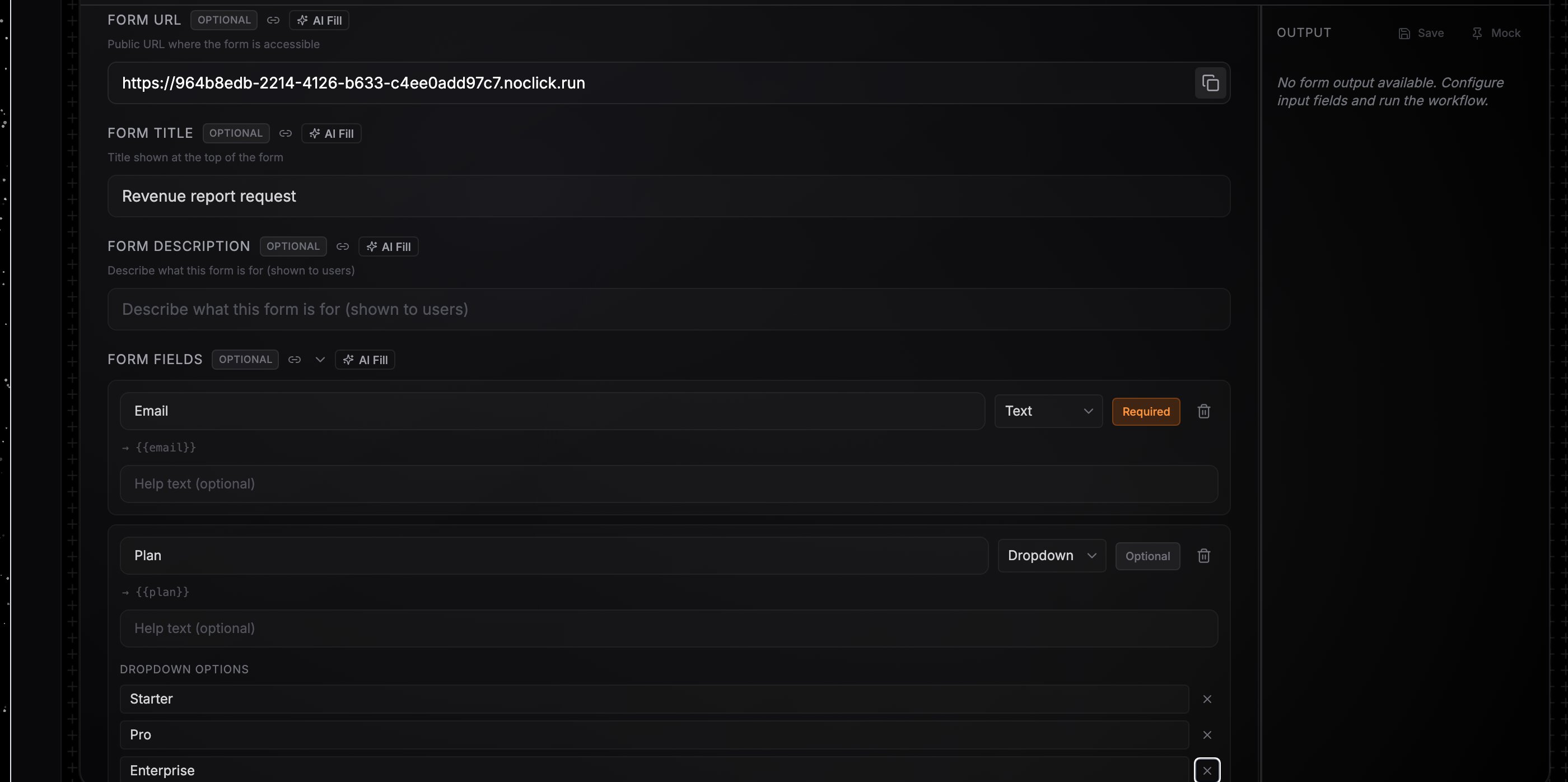
The **Form Input** node starts a run from structured inputs. It gets a public **Form URL** (shown in the config panel with a copy button): opening the URL renders a hosted form built from your field definitions, and submitting it runs the workflow with the entered values.
The same node is also the entry point for runs started from published apps and the [NoClick SDK](/sdk/overview), where `workflow.execute()` passes the inputs programmatically.
 ## Define the form
Add the **Form Input** node and connect it to your first downstream node. Optionally set a **Form Title** and **Form Description**; both appear at the top of the hosted form.
Each field has a **name** (the identifier used in references), a type, an optional label and description, and a required flag. Supported types: `string`, `number`, `boolean`, `object`, `array`, `select` (with an options list), and `credential`.
Copy the **Form URL** and share it. Each submission starts one run, and the submitter sees a confirmation page.
## Reference the values downstream
Submitted values appear on the trigger node's output keyed by field name. Reference them as `{{node-id.fieldName}}`: a field named `email` on a node with ID `form-input-1` is `{{form-input-1.email}}`. Dragging from the node's output panel into a downstream config field builds the reference for you. See [Data references](/editor/data-references).
Runs started from the form show the trigger source `Form` in the **Logs** tab. Disabling the node takes the form offline; visitors see a "currently disabled" message instead.
## Define the form
Add the **Form Input** node and connect it to your first downstream node. Optionally set a **Form Title** and **Form Description**; both appear at the top of the hosted form.
Each field has a **name** (the identifier used in references), a type, an optional label and description, and a required flag. Supported types: `string`, `number`, `boolean`, `object`, `array`, `select` (with an options list), and `credential`.
Copy the **Form URL** and share it. Each submission starts one run, and the submitter sees a confirmation page.
## Reference the values downstream
Submitted values appear on the trigger node's output keyed by field name. Reference them as `{{node-id.fieldName}}`: a field named `email` on a node with ID `form-input-1` is `{{form-input-1.email}}`. Dragging from the node's output panel into a downstream config field builds the reference for you. See [Data references](/editor/data-references).
Runs started from the form show the trigger source `Form` in the **Logs** tab. Disabling the node takes the form offline; visitors see a "currently disabled" message instead.