> ## Documentation Index
> Fetch the complete documentation index at: https://docs.noclick.com/llms.txt
> Use this file to discover all available pages before exploring further.
# Email trigger
> Start workflow runs from inbound email with a reserved name@noclick.app address.
The **Get Email** node starts a run whenever an email arrives at an address you reserve on `noclick.app`. The parsed message (sender, subject, body, attachments) becomes the trigger's output for downstream nodes.
 ## Reserve an address
Add the **Get Email** node and connect it to your first downstream node.
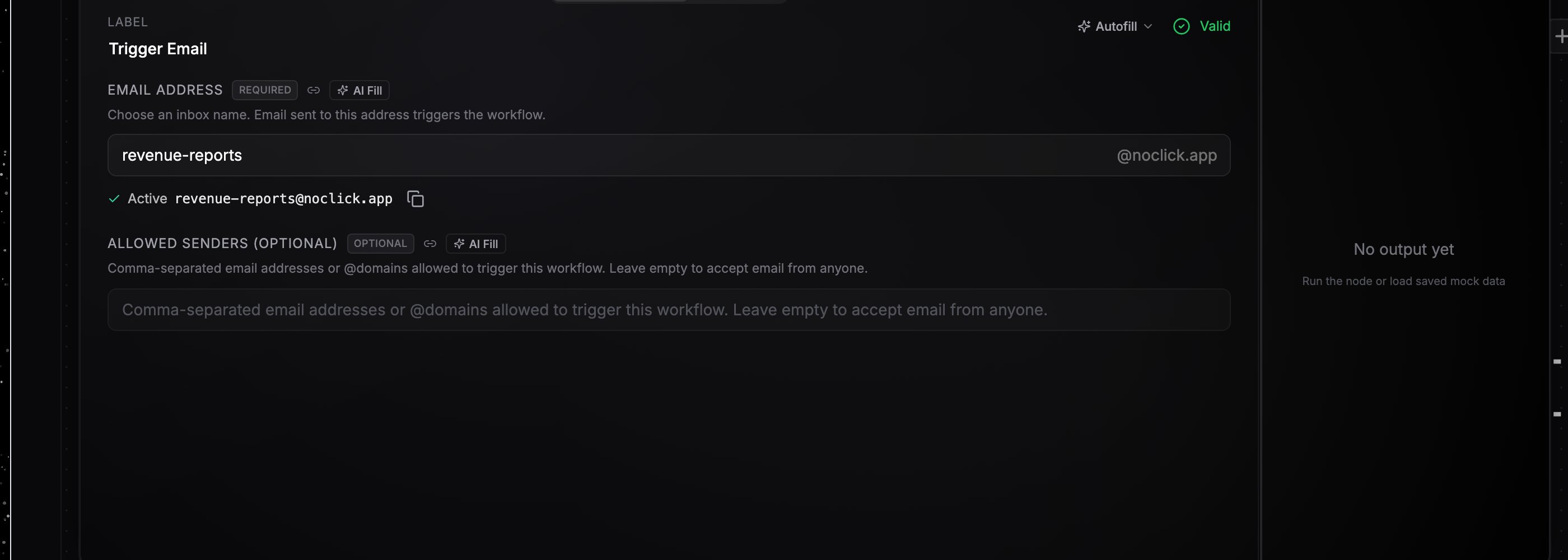
Type an inbox name in the **Email Address** field. Availability is checked live as you type; a free name is reserved automatically and shown as **Active** with the full `name@noclick.app` address and a copy button. Taken names show "That address is already taken".
**Allowed Senders** takes a comma-separated list of email addresses or `@domains`, for example `alice@example.com, @trusted.com`. Leave it empty to accept email from anyone. Mail from a sender not on the list is ignored and the workflow does not run.
## What the event contains
The trigger's output includes:
* `from` and `to`: sender and recipient addresses
* `subject`: the subject line
* `text` and `html`: plain-text and HTML bodies
* `attachments`: a list with `name`, `mime_type`, `size_bytes`, and a `download_url` for each file (stored as workflow resources, up to 256 MB per attachment)
* `headers`: the raw email headers, plus SPF and DKIM verification results
Reference any of it downstream, for example `{{node-id.subject}}` or `{{node-id.attachments[0].download_url}}`. See [Data references](/editor/data-references).
## Email into an AI agent
Wire the Get Email node directly into an AI agent and each inbound email is delivered as part of the agent's turn. The text inside small attached documents is pulled out and included with the email, so the agent can read an attached invoice or contract without a separate step. The agent also gains a locked `email__reply` tool: the recipient and threading are derived server-side from the triggering email, replies are capped at 5 per run, and each send costs 0.01 credits. Replies can include attachments too. See [Channel agents](/agents/channel-agents).
Releasing the address is automatic: deleting the node frees the name for others to reserve.
## Reserve an address
Add the **Get Email** node and connect it to your first downstream node.
Type an inbox name in the **Email Address** field. Availability is checked live as you type; a free name is reserved automatically and shown as **Active** with the full `name@noclick.app` address and a copy button. Taken names show "That address is already taken".
**Allowed Senders** takes a comma-separated list of email addresses or `@domains`, for example `alice@example.com, @trusted.com`. Leave it empty to accept email from anyone. Mail from a sender not on the list is ignored and the workflow does not run.
## What the event contains
The trigger's output includes:
* `from` and `to`: sender and recipient addresses
* `subject`: the subject line
* `text` and `html`: plain-text and HTML bodies
* `attachments`: a list with `name`, `mime_type`, `size_bytes`, and a `download_url` for each file (stored as workflow resources, up to 256 MB per attachment)
* `headers`: the raw email headers, plus SPF and DKIM verification results
Reference any of it downstream, for example `{{node-id.subject}}` or `{{node-id.attachments[0].download_url}}`. See [Data references](/editor/data-references).
## Email into an AI agent
Wire the Get Email node directly into an AI agent and each inbound email is delivered as part of the agent's turn. The text inside small attached documents is pulled out and included with the email, so the agent can read an attached invoice or contract without a separate step. The agent also gains a locked `email__reply` tool: the recipient and threading are derived server-side from the triggering email, replies are capped at 5 per run, and each send costs 0.01 credits. Replies can include attachments too. See [Channel agents](/agents/channel-agents).
Releasing the address is automatic: deleting the node frees the name for others to reserve.