> ## Documentation Index
> Fetch the complete documentation index at: https://docs.noclick.com/llms.txt
> Use this file to discover all available pages before exploring further.
# API keys
> Create, scope, and revoke API keys for the NoClick SDK and programmatic access.
API keys authenticate external apps that connect to NoClick through the [TypeScript](/sdk/typescript) or [Python](/sdk/python) SDK. A key acts on behalf of your account, limited by its permissions and workflow scope.
## Create a key
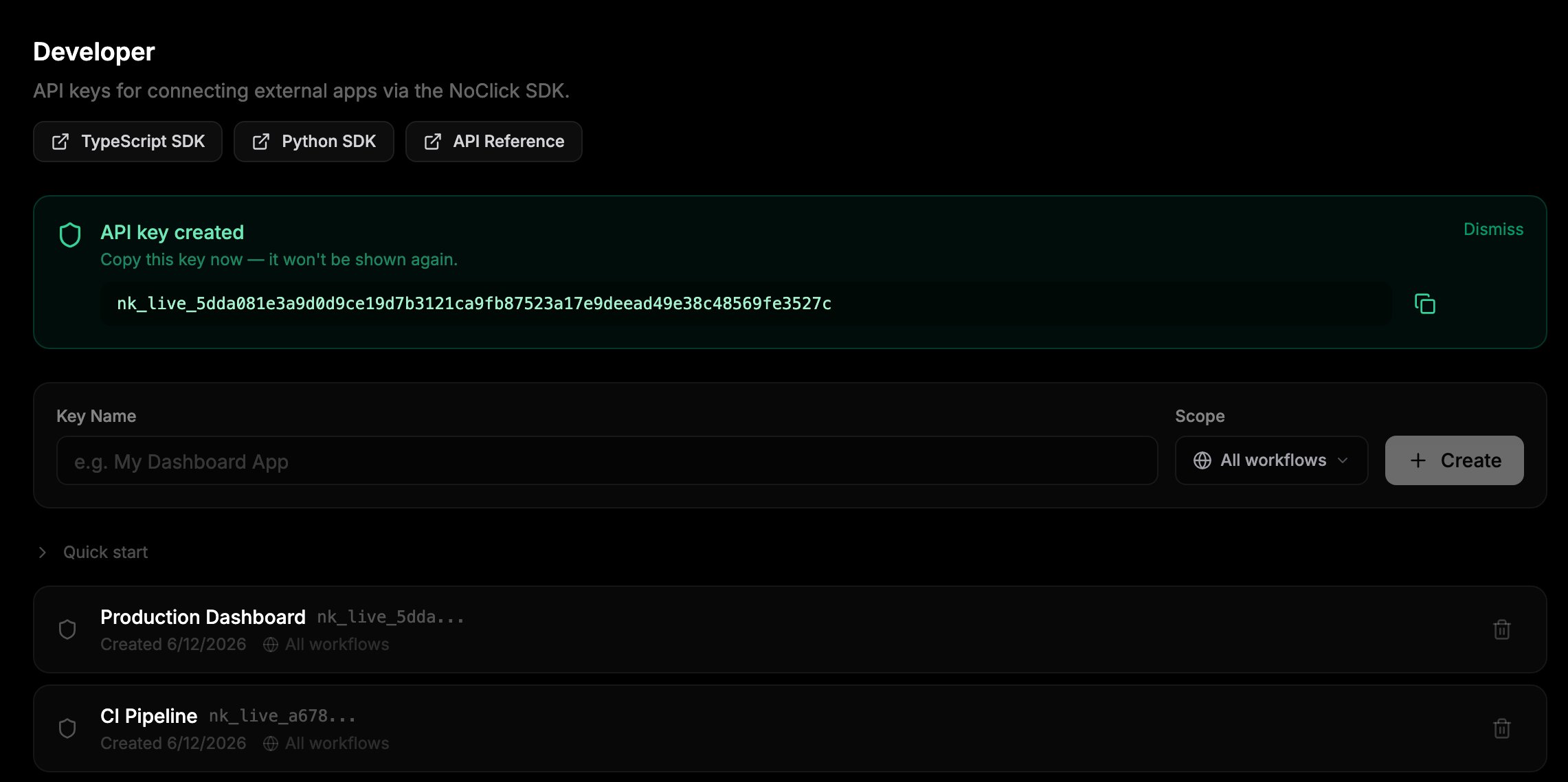
In the NoClick dashboard, go to **Settings** and open the **Developer** section.
Enter a **Key Name** that identifies where you'll use it, for example "My Dashboard App".
Leave the **Scope** dropdown on **All workflows**, or select a single workflow to restrict the key to it.
Click **Create**. The new key appears once in a banner. Copy it now; only a hash is stored, so it cannot be shown again.
 ## Key format
| Part | Example | Description |
| ------ | ----------------- | --------------------------- |
| Prefix | `nk_live_` | Identifies NoClick API keys |
| Secret | `a1b2c3d4e5f6...` | 64 hex characters |
The key list in Developer settings shows only the first 12 characters of each key for identification.
## Permissions
Every SDK call is checked against the key's permissions:
| Permission | Allows |
| ---------- | -------------------------------------------------------------------------------------------------------------------------------------- |
| `read` | List workflows, read node outputs and configs, read workflow state, list credentials, download resources, read dataset rows, list runs |
| `execute` | Run and stop workflows |
| `write` | Create, update, and delete workflows; set node configs; write workflow state; manage credentials; upload resources; modify datasets |
Keys created in Developer settings get all three permissions. To mint a key with fewer permissions, call the REST endpoint below with a narrower `permissions` list.
## Workflow scoping
A key scoped to one workflow rejects any request that targets a different workflow. Use scoped keys when an external app only needs one workflow, so a leaked key cannot touch the rest of your account.
Publishing an app mints its own workflow-scoped key automatically. These keys are managed by NoClick, hidden from your key list, and revoked when you unpublish.
## Use a key
```typescript theme={null}
import { init } from 'noclick';
await init({ apiKey: 'nk_live_...' });
```
```python theme={null}
import noclick
sdk = noclick.Client(api_key="nk_live_...")
await sdk.connect()
```
See [External apps](/sdk/external-apps) for the full connection guide.
## Manage keys over REST
Developer settings is backed by a small REST surface at `https://api.noclick.io` that you can call directly. These endpoints authenticate with your NoClick browser session cookie, not with an API key.
| Method | Path | Purpose |
| -------- | -------------------- | ------------------------------------------------------------------------------------------------------------------------------------------------ |
| `POST` | `/api/keys` | Create a key. Body: `name`, optional `workflow_id`, optional `permissions` (defaults to `["read", "execute", "write"]`). Returns `raw_key` once. |
| `GET` | `/api/keys` | List your keys with name, prefix, scope, permissions, created and last-used timestamps, and revocation status. |
| `DELETE` | `/api/keys/{key_id}` | Revoke a key. |
## Revoke a key
Click the trash icon next to a key in Developer settings. Revocation takes effect immediately; the next request with that key is rejected. Revoked keys stay visible under **Show revoked keys** for reference.
## Security
* Keys are hashed (SHA-256) at rest. The raw key is shown once at creation and never stored.
* Treat keys like passwords: keep them in environment variables, never in source control or client-side code.
* Scope keys to a single workflow whenever possible.
* Check the "Last used" date in the key list and revoke keys you no longer need.
## Next steps
Connect a TypeScript or Python app to NoClick over WebSocket.
Every SDK namespace and method.
## Key format
| Part | Example | Description |
| ------ | ----------------- | --------------------------- |
| Prefix | `nk_live_` | Identifies NoClick API keys |
| Secret | `a1b2c3d4e5f6...` | 64 hex characters |
The key list in Developer settings shows only the first 12 characters of each key for identification.
## Permissions
Every SDK call is checked against the key's permissions:
| Permission | Allows |
| ---------- | -------------------------------------------------------------------------------------------------------------------------------------- |
| `read` | List workflows, read node outputs and configs, read workflow state, list credentials, download resources, read dataset rows, list runs |
| `execute` | Run and stop workflows |
| `write` | Create, update, and delete workflows; set node configs; write workflow state; manage credentials; upload resources; modify datasets |
Keys created in Developer settings get all three permissions. To mint a key with fewer permissions, call the REST endpoint below with a narrower `permissions` list.
## Workflow scoping
A key scoped to one workflow rejects any request that targets a different workflow. Use scoped keys when an external app only needs one workflow, so a leaked key cannot touch the rest of your account.
Publishing an app mints its own workflow-scoped key automatically. These keys are managed by NoClick, hidden from your key list, and revoked when you unpublish.
## Use a key
```typescript theme={null}
import { init } from 'noclick';
await init({ apiKey: 'nk_live_...' });
```
```python theme={null}
import noclick
sdk = noclick.Client(api_key="nk_live_...")
await sdk.connect()
```
See [External apps](/sdk/external-apps) for the full connection guide.
## Manage keys over REST
Developer settings is backed by a small REST surface at `https://api.noclick.io` that you can call directly. These endpoints authenticate with your NoClick browser session cookie, not with an API key.
| Method | Path | Purpose |
| -------- | -------------------- | ------------------------------------------------------------------------------------------------------------------------------------------------ |
| `POST` | `/api/keys` | Create a key. Body: `name`, optional `workflow_id`, optional `permissions` (defaults to `["read", "execute", "write"]`). Returns `raw_key` once. |
| `GET` | `/api/keys` | List your keys with name, prefix, scope, permissions, created and last-used timestamps, and revocation status. |
| `DELETE` | `/api/keys/{key_id}` | Revoke a key. |
## Revoke a key
Click the trash icon next to a key in Developer settings. Revocation takes effect immediately; the next request with that key is rejected. Revoked keys stay visible under **Show revoked keys** for reference.
## Security
* Keys are hashed (SHA-256) at rest. The raw key is shown once at creation and never stored.
* Treat keys like passwords: keep them in environment variables, never in source control or client-side code.
* Scope keys to a single workflow whenever possible.
* Check the "Last used" date in the key list and revoke keys you no longer need.
## Next steps
Connect a TypeScript or Python app to NoClick over WebSocket.
Every SDK namespace and method.