> ## Documentation Index
> Fetch the complete documentation index at: https://docs.noclick.com/llms.txt
> Use this file to discover all available pages before exploring further.
# NoClick Node
> Give your AI agents NoClick MCP tools so they can build, edit, and run workflows themselves
The **NoClick** node gives an AI agent in your workflow NoClick's own MCP tools, the same tools external clients get through [the MCP server](/mcp/available-tools). There is nothing to configure on the auth side: you are already signed in, so the node issues a short-lived access token for your account on every run.
## Add it to an agent
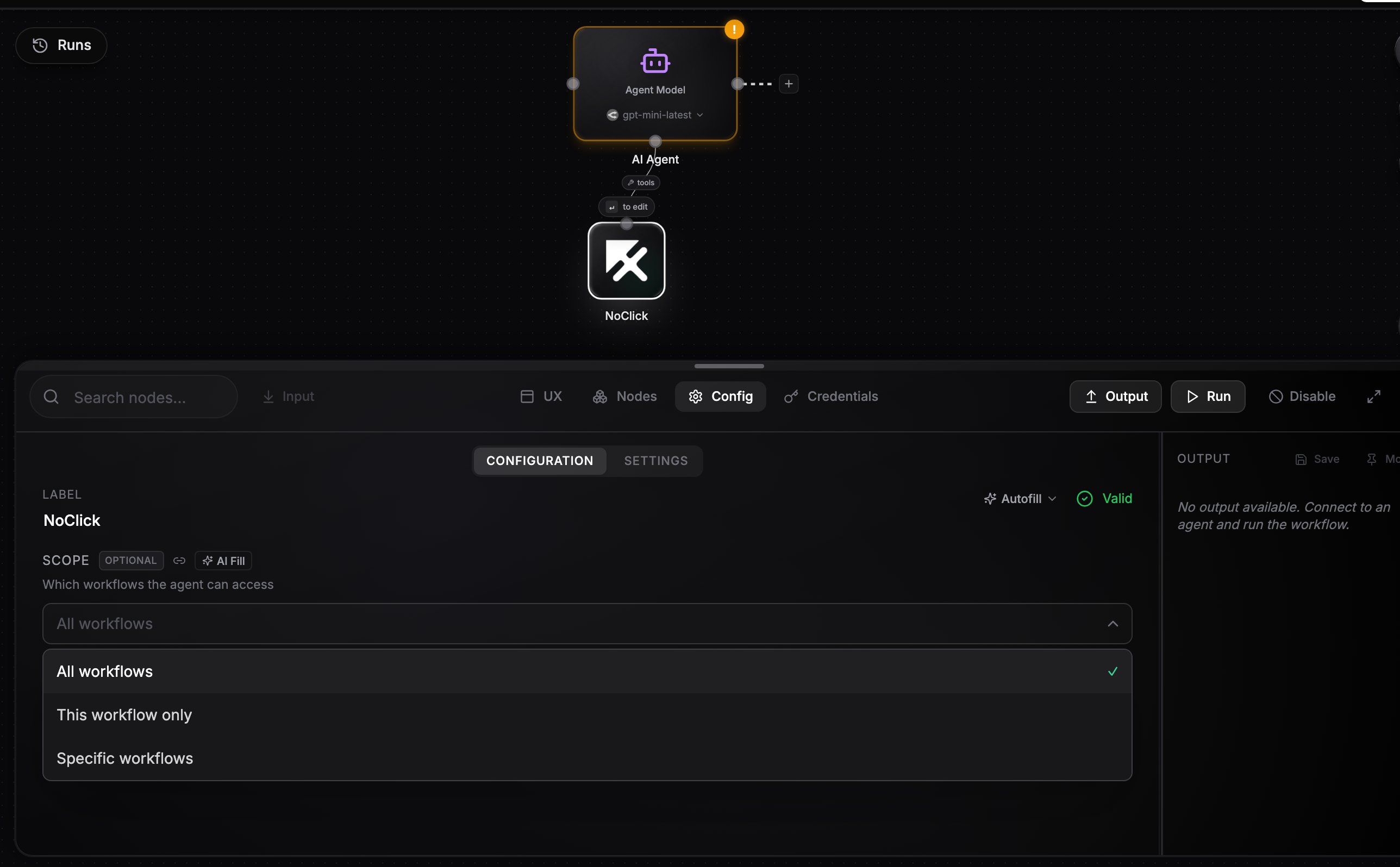
Add a **NoClick** node and wire it into the AI agent's bottom handle, the same way you wire any tool provider. It works with every agent type, including the in-process LLM agent and the CLI agents (Claude Code, Codex, OpenCode).
The agent sees the tools with a `noclick_` prefix: `noclick_create_workflow`, `noclick_update_workflow`, `noclick_run_workflow`, and so on.
 ## Scope
The **Scope** field controls which workflows the agent can touch:
| Option | What the agent gets |
| ---------------------- | ------------------------------------------------------------------ |
| **All workflows** | The full tool set across your whole workspace |
| **This workflow only** | Tools scoped to the workflow the agent runs in |
| **Specific workflows** | Tools scoped to a list you pick in the **Allowed Workflows** field |
When scoped, workspace-level tools (creating, listing, and deleting workflows, folder and workspace management) are hidden, and `workflow_id` parameters are filled in automatically so the agent cannot wander outside its scope. Browser-session tools like `open_workflow` are never included.
## What an agent can do with it
* Create new workflows and wire up nodes with `noclick_update_workflow`
* Inspect and reconfigure nodes in existing workflows
* Run workflows or individual nodes and read their outputs
* Search your credentials to connect nodes that need authentication
## Example: an agent that builds workflows on demand
Wire a Telegram trigger into an AI agent and a NoClick node into the agent's bottom handle, with scope **All workflows**. Message it "build me a workflow that emails me a summary of my GitHub notifications every morning" and the agent creates the workflow, adds and configures the nodes, runs a test, and replies with the result. You get a workflow factory you can drive from chat.
The agent acts as you. With **All workflows** scope it can modify and delete any workflow in your workspace, so scope it down when the agent only needs to manage itself.
## Next steps
The full list of tools the agent can call.
All the ways to give agents tools.
## Scope
The **Scope** field controls which workflows the agent can touch:
| Option | What the agent gets |
| ---------------------- | ------------------------------------------------------------------ |
| **All workflows** | The full tool set across your whole workspace |
| **This workflow only** | Tools scoped to the workflow the agent runs in |
| **Specific workflows** | Tools scoped to a list you pick in the **Allowed Workflows** field |
When scoped, workspace-level tools (creating, listing, and deleting workflows, folder and workspace management) are hidden, and `workflow_id` parameters are filled in automatically so the agent cannot wander outside its scope. Browser-session tools like `open_workflow` are never included.
## What an agent can do with it
* Create new workflows and wire up nodes with `noclick_update_workflow`
* Inspect and reconfigure nodes in existing workflows
* Run workflows or individual nodes and read their outputs
* Search your credentials to connect nodes that need authentication
## Example: an agent that builds workflows on demand
Wire a Telegram trigger into an AI agent and a NoClick node into the agent's bottom handle, with scope **All workflows**. Message it "build me a workflow that emails me a summary of my GitHub notifications every morning" and the agent creates the workflow, adds and configures the nodes, runs a test, and replies with the result. You get a workflow factory you can drive from chat.
The agent acts as you. With **All workflows** scope it can modify and delete any workflow in your workspace, so scope it down when the agent only needs to manage itself.
## Next steps
The full list of tools the agent can call.
All the ways to give agents tools.