> ## Documentation Index
> Fetch the complete documentation index at: https://docs.noclick.com/llms.txt
> Use this file to discover all available pages before exploring further.
# Approvals
> Pause a run for human review with the Approval node, then resume down the approved or rejected path.
The Approval node adds a human checkpoint to a workflow. When the run reaches it, execution pauses and an approval request appears in your **Feed**. Nothing downstream runs until someone decides.
## Configuration
| Field | What it does |
| --------------- | ---------------------------------------------------------------------------------------------------------------------------------------------------------------------------------- |
| **Title** | Short title shown on the approval card |
| **Form Fields** | Fields the reviewer sees. Each has a name, type (string, number, boolean, select, media), label, and a pre-filled value that can reference upstream data, e.g. `{{http-1.amount}}` |
## Reviewing requests
Pending requests live in the **Feed** tab in the top navigation (shortcut `G` then `A`). A badge shows how many are waiting.
Each card shows the form fields filled with their resolved values. The reviewer can edit the values, then click **Approve** or **Reject**. The run resumes down the matching output handle:
| Handle | When it runs |
| ------------ | ------------------------ |
| **Approved** | The request was approved |
| **Rejected** | The request was rejected |
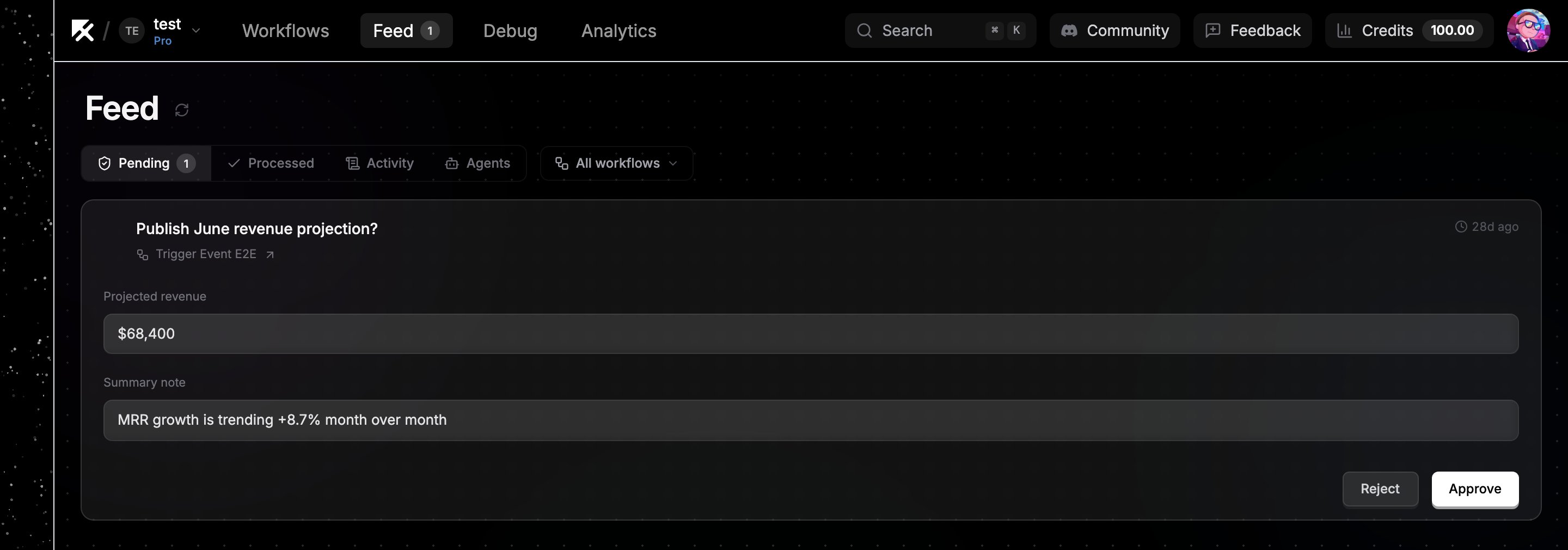 Downstream nodes read the (possibly edited) field values as `{{approval-id.values.field_name}}`.
**Example:** an agent drafts a tweet, an Approval node shows it in a `tweet_text` field, and the **Approved** branch posts `{{approval-id.values.tweet_text}}` to X. The reviewer can tweak the wording right in the card before approving.
While a request is pending, the execution shows a waiting status in [Execution logs](/editor/execution-logs). The card also links back to the workflow and node that created it.
## Next steps
* [Branching](/logic/branching)
* [Running and testing](/editor/running-and-testing)
Downstream nodes read the (possibly edited) field values as `{{approval-id.values.field_name}}`.
**Example:** an agent drafts a tweet, an Approval node shows it in a `tweet_text` field, and the **Approved** branch posts `{{approval-id.values.tweet_text}}` to X. The reviewer can tweak the wording right in the card before approving.
While a request is pending, the execution shows a waiting status in [Execution logs](/editor/execution-logs). The card also links back to the workflow and node that created it.
## Next steps
* [Branching](/logic/branching)
* [Running and testing](/editor/running-and-testing)