> ## Documentation Index
> Fetch the complete documentation index at: https://docs.noclick.com/llms.txt
> Use this file to discover all available pages before exploring further.
# Dashboard
> One page for what needs you, what ran, and what is coming up across your workspace.
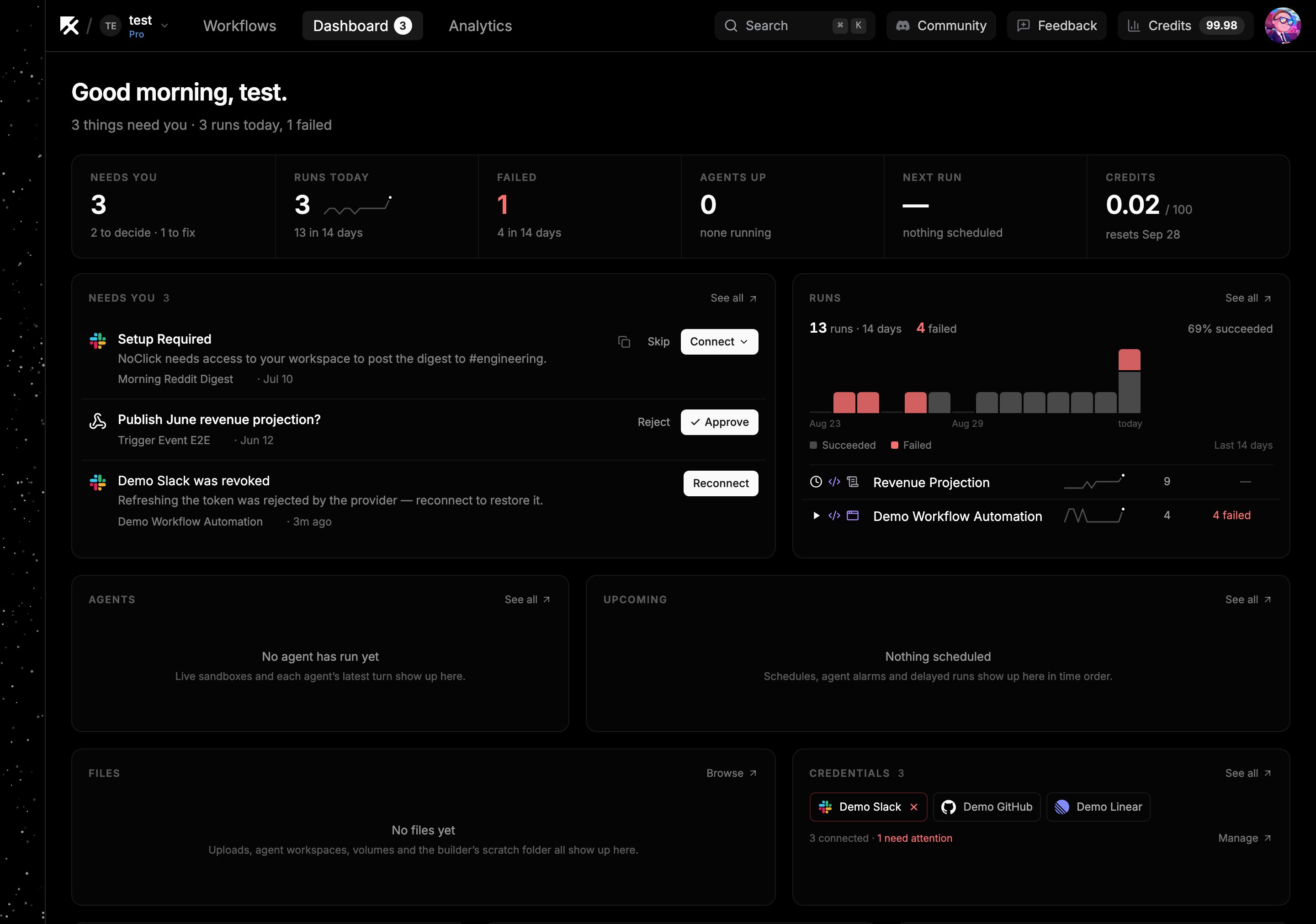
The **Dashboard** tab in the top navigation is the view over everything outside a single workflow: the things waiting on a decision from you, what has run lately, which agents are working, and what is scheduled next. Press `G` then `D` anywhere in the app to open it.
Each area is a card, and every card opens as a full page. A number next to the Dashboard tab counts the items in **Needs you**.
 ## Needs you
Everything that is stopped until a person acts, in one queue. Press `G` then `I` to go straight to it.
| Item | What you do |
| ------------------ | ----------------------------------------------------------------------------------------------------------------------------------------------------------------------- |
| Approval | A run paused at an [Approval node](/logic/approvals). Edit the fields it offers, then **Approve** or **Reject**. |
| Builder question | The [AI builder](/builder/asks) parked on a question. Answer it with the same form the builder chat would show, **Skip** it, or copy a link so someone else can answer. |
| Agent proposal | An agent suggested an edit to its own workflow. **Build it** opens the workflow and hands the request to the builder, or **Dismiss** it. |
| Connect account | A link is out for a connection only a person can make. **Connect** opens it, or copy the link to send on. |
| Credential request | A request you sent someone is still unanswered. **Resend** or **Cancel** it. |
| Disconnected | A connected account stopped working. **Reconnect** opens the same dialog the credential settings use. |
| Trigger broken | A trigger never registered, so its workflow will not wake. **Open trigger** takes you to the node. |
Filter the full page by **Decisions** and **To fix**, or by a single kind.
## The other cards
| Card | What it shows |
| ----------------- | ----------------------------------------------------------------------------------------------------------------------------------------------------------------------------------------------------------------------------------------------- |
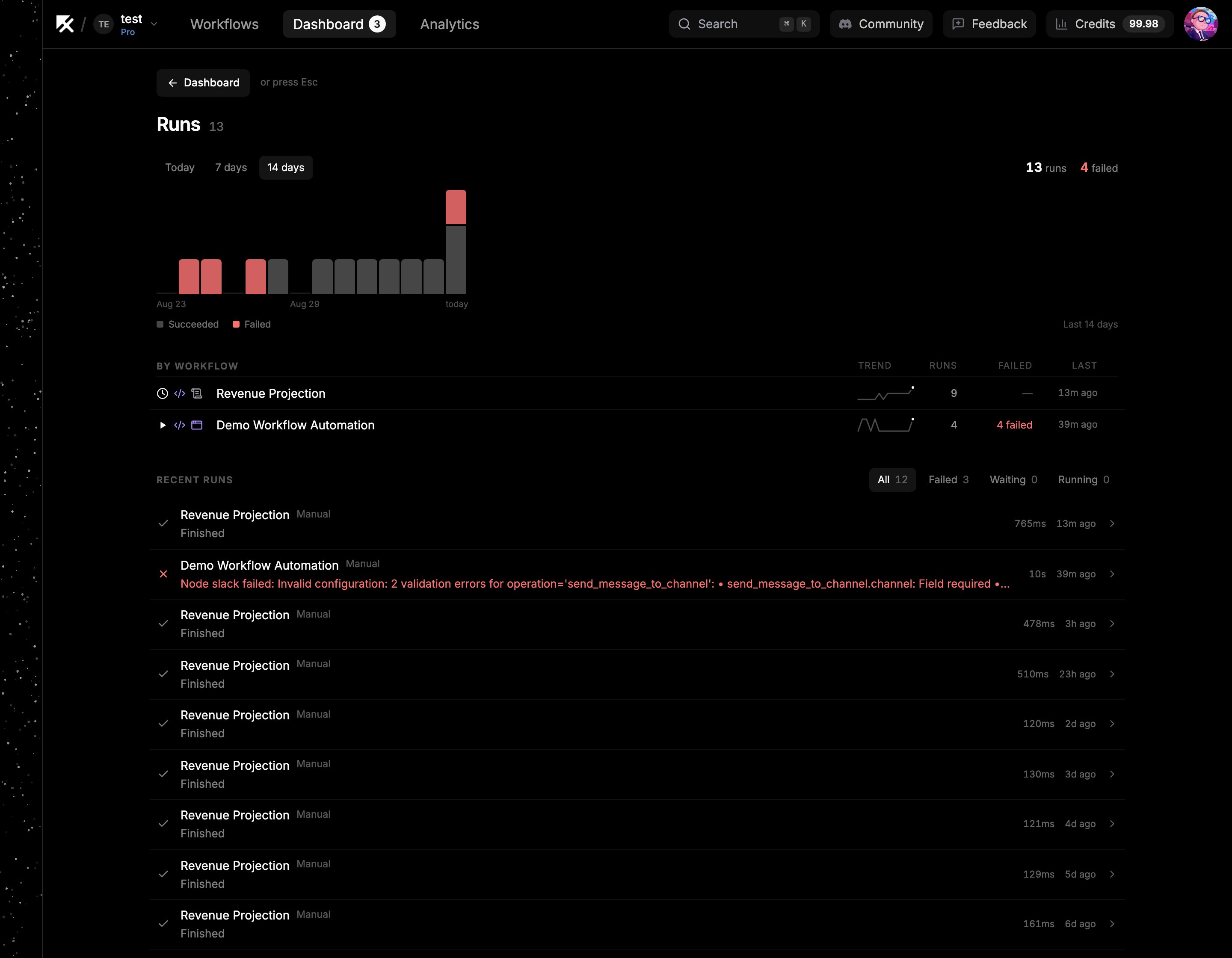
| **Runs** | Runs per day over the last 14 days, the share that succeeded, and each workflow's run and failure counts. Open a workflow from its row, or open a single run to see its results. Filter recent runs by **Failed**, **Waiting**, or **Running**. |
| **Agents** | Sandboxes that are up right now, and each agent's latest turns with the message that came in, the messages it sent, and every tool call. Filter turns by **Failed**. |
| **Upcoming** | Schedules, agent alarms, and delayed runs in time order. |
| **Files** | Workflow uploads and outputs, agent workspaces, and the builder's scratch folder. Preview images, video, audio, and datasets in place, and upload or delete where you have write access. |
| **Credentials** | Every connected account with its health, worst first. Click one to manage it, or a disconnected one to reconnect it. |
| **Triggers** | Schedules, webhooks, and app events that wake your workflows, split into armed and broken. **Fix** opens a broken one. |
| **Credits** | Credits used against your plan's allowance. **Usage** opens the [usage dashboard](/billing/usage-dashboard). |
| **Notifications** | Run failures, credit alerts, and your weekly digest. |
## Needs you
Everything that is stopped until a person acts, in one queue. Press `G` then `I` to go straight to it.
| Item | What you do |
| ------------------ | ----------------------------------------------------------------------------------------------------------------------------------------------------------------------- |
| Approval | A run paused at an [Approval node](/logic/approvals). Edit the fields it offers, then **Approve** or **Reject**. |
| Builder question | The [AI builder](/builder/asks) parked on a question. Answer it with the same form the builder chat would show, **Skip** it, or copy a link so someone else can answer. |
| Agent proposal | An agent suggested an edit to its own workflow. **Build it** opens the workflow and hands the request to the builder, or **Dismiss** it. |
| Connect account | A link is out for a connection only a person can make. **Connect** opens it, or copy the link to send on. |
| Credential request | A request you sent someone is still unanswered. **Resend** or **Cancel** it. |
| Disconnected | A connected account stopped working. **Reconnect** opens the same dialog the credential settings use. |
| Trigger broken | A trigger never registered, so its workflow will not wake. **Open trigger** takes you to the node. |
Filter the full page by **Decisions** and **To fix**, or by a single kind.
## The other cards
| Card | What it shows |
| ----------------- | ----------------------------------------------------------------------------------------------------------------------------------------------------------------------------------------------------------------------------------------------- |
| **Runs** | Runs per day over the last 14 days, the share that succeeded, and each workflow's run and failure counts. Open a workflow from its row, or open a single run to see its results. Filter recent runs by **Failed**, **Waiting**, or **Running**. |
| **Agents** | Sandboxes that are up right now, and each agent's latest turns with the message that came in, the messages it sent, and every tool call. Filter turns by **Failed**. |
| **Upcoming** | Schedules, agent alarms, and delayed runs in time order. |
| **Files** | Workflow uploads and outputs, agent workspaces, and the builder's scratch folder. Preview images, video, audio, and datasets in place, and upload or delete where you have write access. |
| **Credentials** | Every connected account with its health, worst first. Click one to manage it, or a disconnected one to reconnect it. |
| **Triggers** | Schedules, webhooks, and app events that wake your workflows, split into armed and broken. **Fix** opens a broken one. |
| **Credits** | Credits used against your plan's allowance. **Usage** opens the [usage dashboard](/billing/usage-dashboard). |
| **Notifications** | Run failures, credit alerts, and your weekly digest. |
 ## Moving around
Opening a card puts its name in the address bar, so a drill-down is a page you can link to or come back to with the browser's Back button. Press `Esc` or click **Dashboard** at the top left to return to the grid. The section you were in is remembered while you work in other tabs, and reopening the Dashboard puts you back there.
## Next steps
* [Approvals](/logic/approvals)
* [Execution logs](/editor/execution-logs)
* [Email notifications](/billing/notifications)
## Moving around
Opening a card puts its name in the address bar, so a drill-down is a page you can link to or come back to with the browser's Back button. Press `Esc` or click **Dashboard** at the top left to return to the grid. The section you were in is remembered while you work in other tabs, and reopening the Dashboard puts you back there.
## Next steps
* [Approvals](/logic/approvals)
* [Execution logs](/editor/execution-logs)
* [Email notifications](/billing/notifications)