> ## Documentation Index
> Fetch the complete documentation index at: https://docs.noclick.com/llms.txt
> Use this file to discover all available pages before exploring further.
# Data references
> Pass data between nodes with {{node_id.field}} references, by dragging values or typing them.
Any config field can read from an upstream node's output using a reference wrapped in double curly braces:
```text theme={null}
{{node_id.path.to.field}}
```
The first segment is the upstream node's ID; the rest navigates into that node's output.
## Reference patterns
| Reference | Resolves to |
| --------------------------- | ----------------------------------- |
| `{{node-1}}` | The node's entire output |
| `{{node-1.message}}` | The `message` field of the output |
| `{{node-1.user.name}}` | A nested field |
| `{{node-1.items[0].title}}` | The `title` of the first array item |
| `{{node-1.items[].title}}` | A list of every item's `title` |
When a field contains exactly one reference, the value keeps its original type (object, list, number). When a reference sits inside other text, like `Hello {{node-1.user.name}}!`, it is converted to a string.
## Dragging references
The easiest way to build a reference is to not type it at all:
Run the upstream node once (or give it a [mocked output](/editor/running-and-testing)).
Select the upstream node and click **Output** (`Y`) in the config panel.
Grab any value in the output and drop it onto a config field. The correct reference is inserted as a chip.
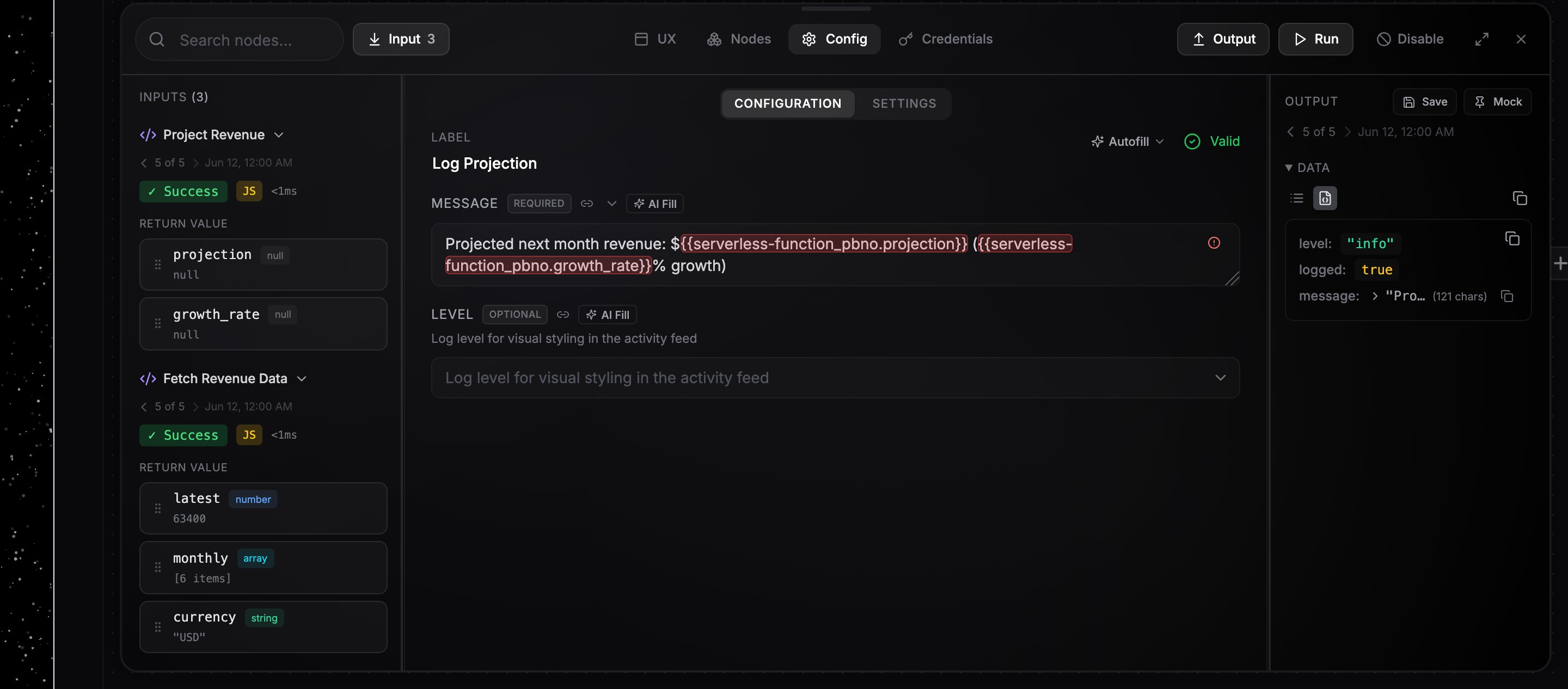 You can also type `{{` in any text field to get autocomplete suggestions built from the connected nodes' actual output.
## Inline expressions
When you need to transform a value, not just read it, write a JavaScript expression inside `{{ }}` using `$`-accessors. The expression runs in a sandbox at execution time and its result is substituted into the field. No separate code node needed for basic string or number work.
| Accessor | Reads |
| ------------- | ------------------------------------------------------------------------------ |
| `$('node-1')` | another node's whole output (use the node's id, or its label: `$('My Sheet')`) |
| `$vars` | workflow variables, e.g. `$vars.api_base` |
| `$json` | the single upstream node's output flowing into this node |
Because it's JavaScript, you get the full language:
```text theme={null}
{{ $('form').emails.split(",")[0].trim() }}
{{ $('sheet').rows.map(r => r.email).join(", ") }}
{{ $vars.threshold * 2 }}
{{ $('user').age > 18 ? "adult" : "minor" }}
Hi {{ $('user').name.toUpperCase() }}!
```
Two small helpers are also available: `$if(condition, a, b)` and `$ifEmpty(value, fallback)`.
When the whole field is a single expression, the result keeps its type (number, list, object). When an expression sits inside other text, the result is converted to a string, the same rule as plain references.
The easiest way to build one is to drag a value from a node's Output panel into a field, which inserts the `$('node-1').field` form, then add your transform (`.split(",")`, `* 2`, …). While the field holds an expression, a live preview under it shows the computed result against the connected nodes' latest output, and one-click chips insert the available accessors.
Plain references like `{{node-1.message}}` keep working exactly as before. An expression is only evaluated when the `{{ }}` uses a `$`-accessor, so literal `{{name}}` placeholders meant for a downstream system still pass through untouched.
## Common mistake: `.output.` in the path
References navigate the node's output directly, so do not insert an `output` segment:
```text theme={null}
{{node-1.message}} ✓ correct
{{node-1.output.message}} ✗ looks for a literal "output" key and resolves to nothing
```
Dragged and autocompleted references always use the correct form.
Workflow variables are available under the reserved `vars` ID, e.g. `{{vars.api_base}}`. See [Variables and state](/logic/variables-state).
You can also type `{{` in any text field to get autocomplete suggestions built from the connected nodes' actual output.
## Inline expressions
When you need to transform a value, not just read it, write a JavaScript expression inside `{{ }}` using `$`-accessors. The expression runs in a sandbox at execution time and its result is substituted into the field. No separate code node needed for basic string or number work.
| Accessor | Reads |
| ------------- | ------------------------------------------------------------------------------ |
| `$('node-1')` | another node's whole output (use the node's id, or its label: `$('My Sheet')`) |
| `$vars` | workflow variables, e.g. `$vars.api_base` |
| `$json` | the single upstream node's output flowing into this node |
Because it's JavaScript, you get the full language:
```text theme={null}
{{ $('form').emails.split(",")[0].trim() }}
{{ $('sheet').rows.map(r => r.email).join(", ") }}
{{ $vars.threshold * 2 }}
{{ $('user').age > 18 ? "adult" : "minor" }}
Hi {{ $('user').name.toUpperCase() }}!
```
Two small helpers are also available: `$if(condition, a, b)` and `$ifEmpty(value, fallback)`.
When the whole field is a single expression, the result keeps its type (number, list, object). When an expression sits inside other text, the result is converted to a string, the same rule as plain references.
The easiest way to build one is to drag a value from a node's Output panel into a field, which inserts the `$('node-1').field` form, then add your transform (`.split(",")`, `* 2`, …). While the field holds an expression, a live preview under it shows the computed result against the connected nodes' latest output, and one-click chips insert the available accessors.
Plain references like `{{node-1.message}}` keep working exactly as before. An expression is only evaluated when the `{{ }}` uses a `$`-accessor, so literal `{{name}}` placeholders meant for a downstream system still pass through untouched.
## Common mistake: `.output.` in the path
References navigate the node's output directly, so do not insert an `output` segment:
```text theme={null}
{{node-1.message}} ✓ correct
{{node-1.output.message}} ✗ looks for a literal "output" key and resolves to nothing
```
Dragged and autocompleted references always use the correct form.
Workflow variables are available under the reserved `vars` ID, e.g. `{{vars.api_base}}`. See [Variables and state](/logic/variables-state).