> ## Documentation Index
> Fetch the complete documentation index at: https://docs.noclick.com/llms.txt
> Use this file to discover all available pages before exploring further.
# Tools from integrations
> Turn any integration node into agent tools by wiring it into the agent's bottom handle and allowlisting operations.
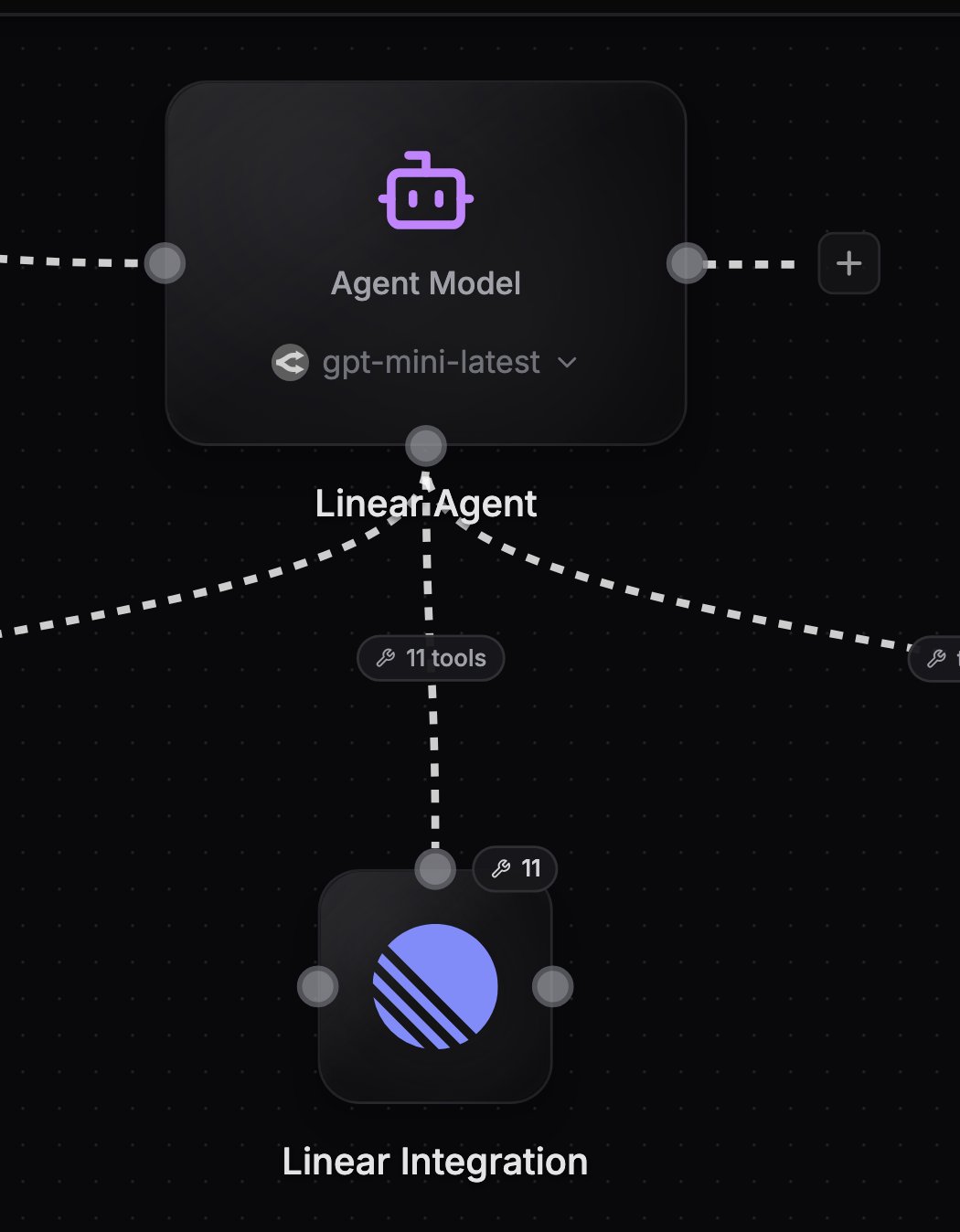
Most integration nodes (about 58 types) can act as tool providers for an agent. Instead of running one fixed operation, the node exposes the operations you allowlist as tools the agent calls on demand: `linear__create_issue`, `slack__send_message_to_channel`, and so on.
## Wire a tool provider
Drag an edge from the integration node's top handle to the agent's bottom handle. Or click **Add tool** in the agent's config panel and pick the service from the palette, which creates and wires the node for you.
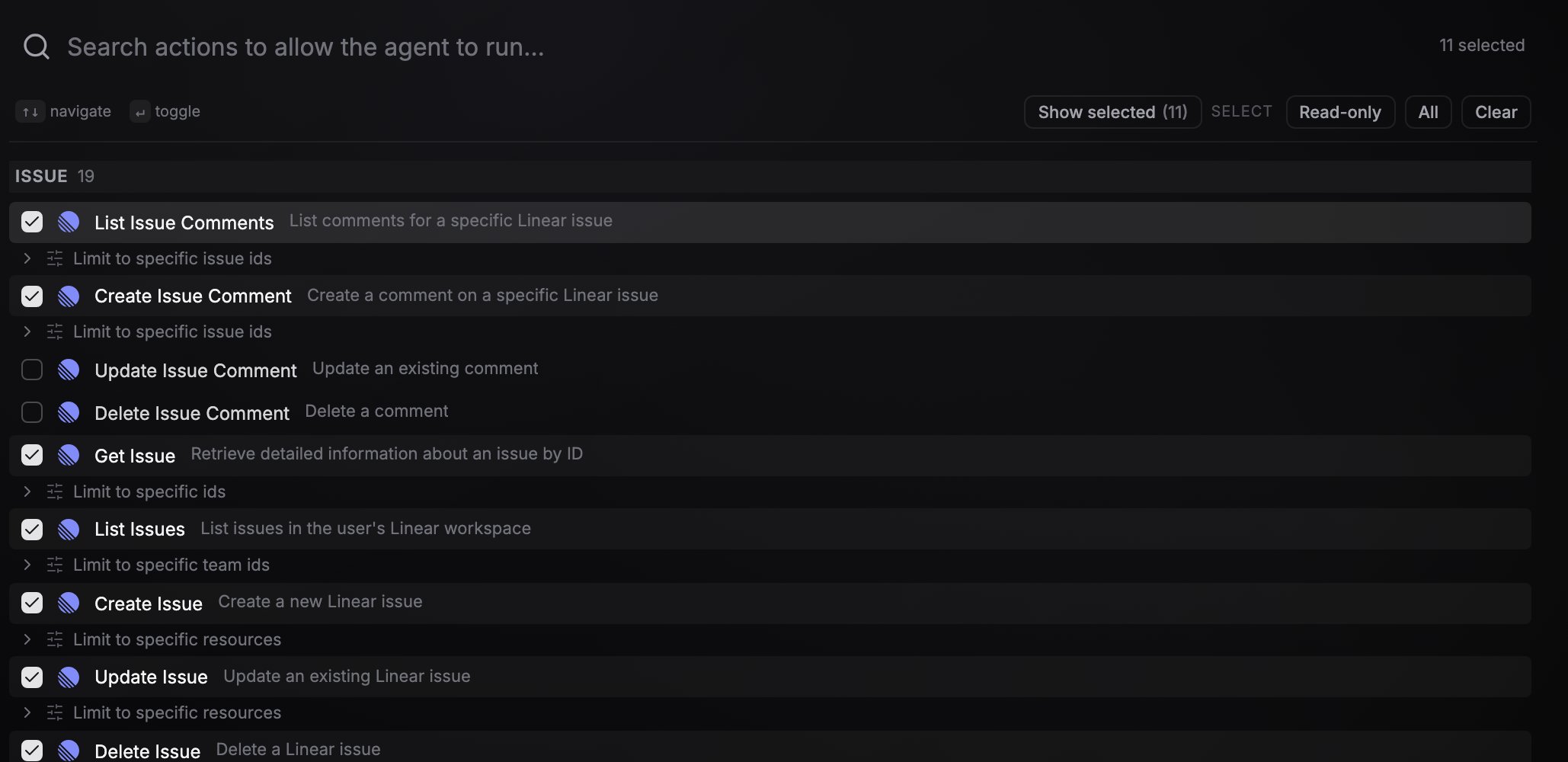
Once wired, the node's config panel switches from a single-operation form to an operation allowlist. Search for actions, or use the quick selects: **Read-only** (list/get/search actions, no mutations), **All**, or **Clear**. For services with a long list of actions, the **Show selected** toggle filters the list down to just the ones you have allowlisted. The same picker appears in the setup view when you set up a tool-provider node.
For operations that act on a typed resource ID, expand **Limit to specific...** under the operation and pick which documents, sheets, or other records the agent may act on. The agent can then use that operation only against the resources you pinned. When a create operation makes a new resource, its ID is added to the matching scope for you, so the agent can immediately read back what it just created.
Attach the service credential as usual. The agent calls every tool with this credential.
Each allowlisted operation becomes a tool named `{service}__{operation}`. The agent also gets one automatic `{service}__lookup_options` tool for looking up IDs (channels, projects, sheets) so it can fill ID parameters without guessing.
 ## Rules
* **A tool provider is tools-only.** It cannot also feed its output into normal dataflow nodes, and it cannot have a trigger operation selected.
* **Use two nodes of the same service** when you need both roles, for example one Slack node with a trigger operation wired into the agent's input and a second Slack node wired as a tool provider with send operations allowlisted. This is the [channel agent](/agents/channel-agents) pattern.
* **Multiple providers of the same service** on one agent are fine: tool names get label-derived suffixes and the node and credential labels appear in tool descriptions so the agent can tell them apart.
* **Tools are scoped per agent.** Two agents on the same canvas only see the tools wired into their own bottom handle.
Every tool call an agent makes is recorded. Open a run in [execution logs](/editor/execution-logs) and click the agent node to see each call's arguments, result, and duration. The **Agents** tab in the Feed lists these calls across all your runs, grouped by run, with the agent's model, each call's inputs and result, and the final response.
## Next steps
Give agents tools from external MCP servers or from NoClick itself.
Combine a trigger node and a send-tool node of the same service.
## Rules
* **A tool provider is tools-only.** It cannot also feed its output into normal dataflow nodes, and it cannot have a trigger operation selected.
* **Use two nodes of the same service** when you need both roles, for example one Slack node with a trigger operation wired into the agent's input and a second Slack node wired as a tool provider with send operations allowlisted. This is the [channel agent](/agents/channel-agents) pattern.
* **Multiple providers of the same service** on one agent are fine: tool names get label-derived suffixes and the node and credential labels appear in tool descriptions so the agent can tell them apart.
* **Tools are scoped per agent.** Two agents on the same canvas only see the tools wired into their own bottom handle.
Every tool call an agent makes is recorded. Open a run in [execution logs](/editor/execution-logs) and click the agent node to see each call's arguments, result, and duration. The **Agents** tab in the Feed lists these calls across all your runs, grouped by run, with the agent's model, each call's inputs and result, and the final response.
## Next steps
Give agents tools from external MCP servers or from NoClick itself.
Combine a trigger node and a send-tool node of the same service.