> ## Documentation Index
> Fetch the complete documentation index at: https://docs.noclick.com/llms.txt
> Use this file to discover all available pages before exploring further.
# Agent scheduling with alarms
> Let an agent schedule its own future wake-ups with the alarm node, one-off or recurring, and continue the conversation when they fire.
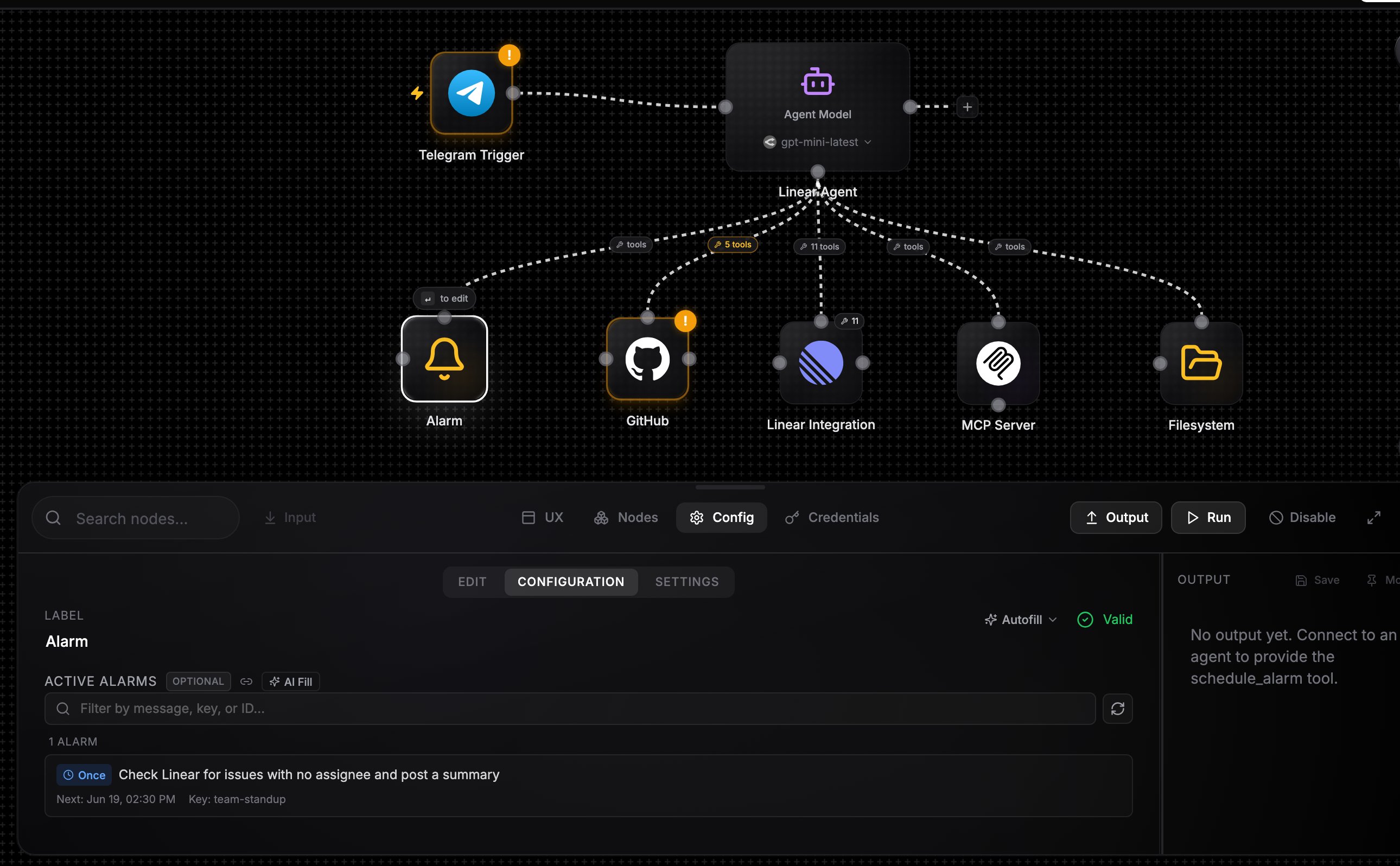
The **Alarm** node lets an agent schedule its own future runs. Wire it from its top handle into the agent's bottom handle, like a tool, or add it from the agent's **Add tool** palette. The agent gets four tools:
| Tool | What it does |
| ---------------- | ---------------------------------------------------------------------------------------------------------------------------------------------------------------------------------------- |
| `schedule_alarm` | Set an alarm: a countdown (`30s`, `5m`, `2h`, `1d`), a specific ISO 8601 datetime, or a recurring cron expression (`0 9 * * 1`). Includes a message the agent will receive when it fires |
| `list_alarms` | List active alarms with their schedule IDs, next run times, and messages |
| `cancel_alarm` | Delete an alarm by schedule ID |
| `update_alarm` | Enable or disable an alarm, or change its message |
## What happens when an alarm fires
The workflow runs and the agent wakes with the stored message delivered as an event in its turn, alongside its standing instructions from the **Message** field. The alarm also carries the [conversation key](/agents/conversations) that was active when it was scheduled, so the agent resumes the same conversation with full context of why it set the alarm.
The alarm node's config panel shows an **Active Alarms** viewer so you can inspect and audit what the agent has scheduled.
 ## Example: a daily research agent
Create an agent, wire in an **Alarm** node, and wire a send tool (for example a Slack node with **Send Message to Channel** allowlisted) so the agent can deliver results.
In **Message**: "You are a research assistant. When asked to monitor a topic, schedule a daily alarm. When an alarm fires, research the topic and post a summary to Slack."
Run the agent once with a request like "track AI agent frameworks every morning at 9". The agent calls `schedule_alarm` with the cron `0 9 * * *` and a message describing the task.
Each morning the alarm fires, the agent wakes with its own note, does the research, and posts the summary. Ask it to stop and it calls `cancel_alarm`.
Alarms are for agent self-scheduling. To run a whole workflow on a fixed schedule you define yourself, use a [schedule trigger](/triggers/schedules) instead.
## Example: a daily research agent
Create an agent, wire in an **Alarm** node, and wire a send tool (for example a Slack node with **Send Message to Channel** allowlisted) so the agent can deliver results.
In **Message**: "You are a research assistant. When asked to monitor a topic, schedule a daily alarm. When an alarm fires, research the topic and post a summary to Slack."
Run the agent once with a request like "track AI agent frameworks every morning at 9". The agent calls `schedule_alarm` with the cron `0 9 * * *` and a message describing the task.
Each morning the alarm fires, the agent wakes with its own note, does the research, and posts the summary. Ask it to stop and it calls `cancel_alarm`.
Alarms are for agent self-scheduling. To run a whole workflow on a fixed schedule you define yourself, use a [schedule trigger](/triggers/schedules) instead.