> ## Documentation Index
> Fetch the complete documentation index at: https://docs.noclick.com/llms.txt
> Use this file to discover all available pages before exploring further.
# Channel agents
> Build chat-style agents on Slack, Telegram, WhatsApp, or email: a trigger delivers each message, a send tool replies.
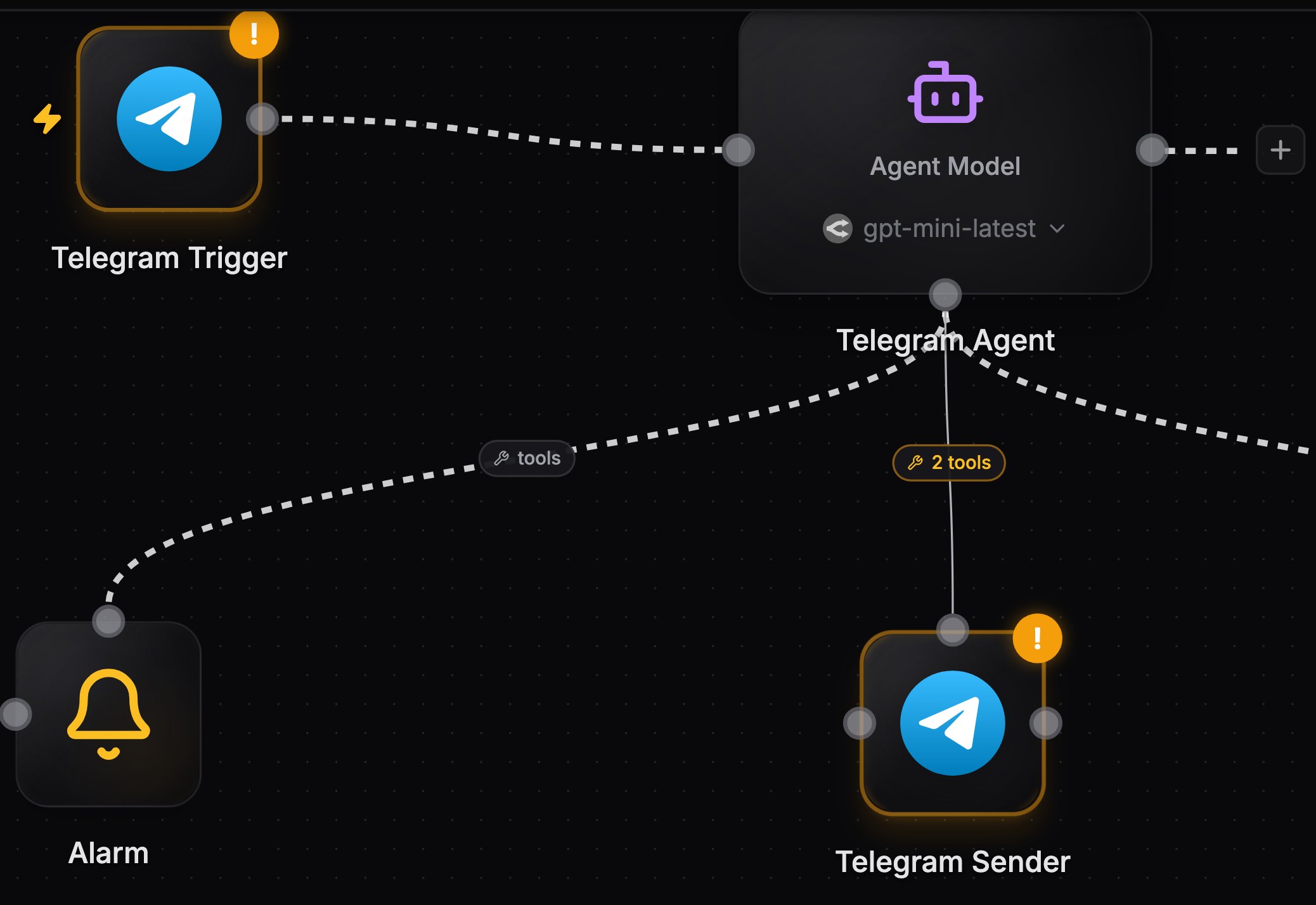
A channel agent listens on a messaging service and replies in place. The pattern uses two nodes of the same service, because one node cannot be both a trigger and a tool provider:
1. **Trigger in**: a node with the service's trigger operation (for example Telegram **Receive Webhook Messages**, Slack **On Channel Message** or **On App Mention**, WhatsApp **Receive Message**) wired into the agent's left input.
2. **Reply out**: a second node of the same service wired as a [tool provider](/agents/tools) with send operations allowlisted (for example Slack **Send Message to Channel**).
 ## How a turn works
Each incoming message is delivered to the agent as an event alongside its standing instructions from the **Message** field. The event includes the reply IDs (chat ID, channel and thread), so the agent passes them to its send tool to answer in the right place.
Chat triggers (Telegram, Slack, WhatsApp, Discord, Microsoft Teams, and more) also set the [conversation key](/agents/conversations) automatically (per chat, per thread), so follow-up messages continue the same conversation with memory.
Add an AI Agent node, click **Add trigger** in its panel, and pick the service and trigger type. Connect credentials.
In **Message**, describe the agent's job and tell it to reply using its send tool, quoting the chat or thread from the incoming event.
Click **Add tool**, pick the same service, and allowlist the send operations the agent may use.
Send a message on the channel and watch the run in [execution logs](/editor/execution-logs), including each tool call the agent made.
## Email is a special case
There is no user-wirable email send node for arbitrary recipients. Instead, when an [inbound email trigger](/triggers/email) is wired directly into an agent, the agent automatically gains a locked `email__reply` tool:
* The recipient and threading are derived server-side from the email that fired the run; the agent only writes the reply body.
* Replies are capped at 5 per run, are only valid within 48 hours of the inbound message, and each send costs 0.01 credits.
Slack message triggers do not filter bot-authored messages. An agent that posts into the same channel it triggers on will trigger itself in a loop. Trigger on **On App Mention**, reply into a different channel, or instruct the agent so its replies cannot re-match the trigger.
## Next steps
How per-chat and per-thread memory works.
Reserve an inbound address on noclick.app.
## How a turn works
Each incoming message is delivered to the agent as an event alongside its standing instructions from the **Message** field. The event includes the reply IDs (chat ID, channel and thread), so the agent passes them to its send tool to answer in the right place.
Chat triggers (Telegram, Slack, WhatsApp, Discord, Microsoft Teams, and more) also set the [conversation key](/agents/conversations) automatically (per chat, per thread), so follow-up messages continue the same conversation with memory.
Add an AI Agent node, click **Add trigger** in its panel, and pick the service and trigger type. Connect credentials.
In **Message**, describe the agent's job and tell it to reply using its send tool, quoting the chat or thread from the incoming event.
Click **Add tool**, pick the same service, and allowlist the send operations the agent may use.
Send a message on the channel and watch the run in [execution logs](/editor/execution-logs), including each tool call the agent made.
## Email is a special case
There is no user-wirable email send node for arbitrary recipients. Instead, when an [inbound email trigger](/triggers/email) is wired directly into an agent, the agent automatically gains a locked `email__reply` tool:
* The recipient and threading are derived server-side from the email that fired the run; the agent only writes the reply body.
* Replies are capped at 5 per run, are only valid within 48 hours of the inbound message, and each send costs 0.01 credits.
Slack message triggers do not filter bot-authored messages. An agent that posts into the same channel it triggers on will trigger itself in a loop. Trigger on **On App Mention**, reply into a different channel, or instruct the agent so its replies cannot re-match the trigger.
## Next steps
How per-chat and per-thread memory works.
Reserve an inbound address on noclick.app.